

The Leading Customer Support Tools and Resources

Customer support plays a huge role in scaling your business especially if you have a digital product. As we all know, things can easily go south with the functionality of digital products which often leads to unsatisfied customers. That’s exactly where customer support steps in. 

If you’re thinking about launching a customer support section within your company or you already have one and looking to improve it, then we’re certain you will find these tools and resources extremely useful!

Customer Support Operations

There’s a lot going on in customer support so it’s essential to have proper tools that will handle and manage operations, optimize processes and make sure everything goes smooth but also ensure that your customers are not on the stand-by.

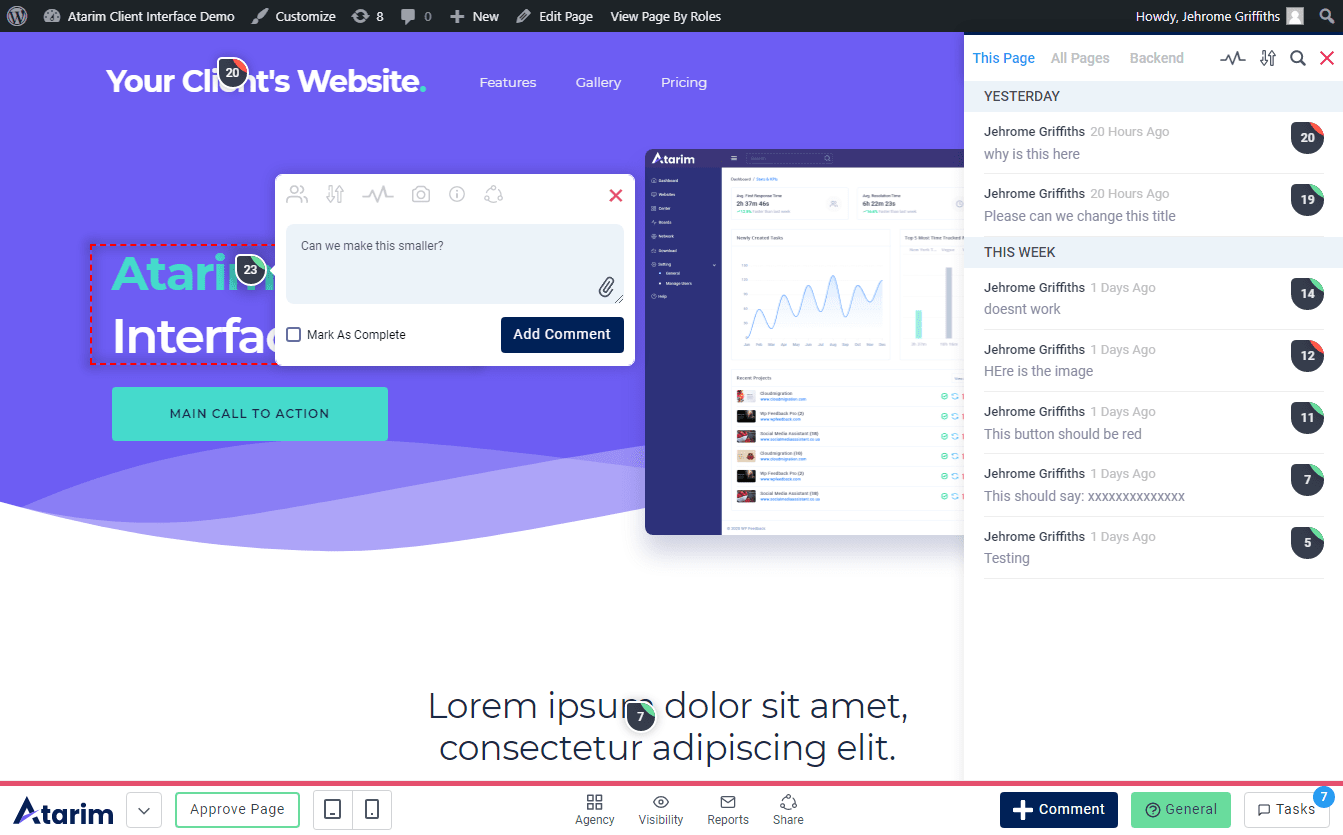
Atarim

atarim homepage

Yep, we’re putting ourselves first, but hear us out — Atarim is the ultimate tool for managing clients and your organization all in one place!

Essentially, web designers and web developers will find the most use out of Atarim, but in general, any type of agency or freelancer can scale their business with Atarim.

With Atarim you will be able to communicate with clients, have email support for your customers, have a super-advanced time tracking and branded reports, incredible in-house management, and a ticketing system, pretty much everything one agency would need to optimize their time for the biggest efficiency.

Get the most out of your organization and start with Atarim now!

Missive

missive homepage

Even though it’s not popular as some other software of this sort on the list, Missive is definitely one of the best email clients out there!

If you have a small agency or small team of people working with you, then Missive might be just what you’re looking for when it comes to email clients:

  • It’s super simple
  • Can be used as a personal email client
  • Can be used as team/shared inbox
  • You can share your personal email with the rest of the team
  • Chat with the team in the email threads

…and many other things!

The Missive is super simple to use, it has some incredible features, it’s reliable and we’re confident you and your team will love it!

Teamwork Desk

teamwork desk homepage

Desk by Teamwork is an amazing ticketing system that allows you to easily manage customer queries.

Desk is pretty good when it comes to customization of the ticketing system but also they have an amazing feature of automated responses. Being able to respond to your customer query instantly is definitely something your customers will appreciate very much.

Other features include:

  • Time tracking
  • Setting priority levels to tickets
  • Custom tagging
  • Ability to integrate Desk to Teamwork CRM

Their pricing starts at $7 per user per month for the most basic plans.

HubSpot

hubspot homepage

HubSpot is a very well-known platform in the world of CRM software, and it’s no wonder — they have been on the market for a long time and millions of users use their products.

Their solution for customer support is Service Hub which is one of the multiple solutions they have for various purposes.

Service Hub allows you to:

  • Create tickets 
  • Create knowledge base
  • Live chat
  • VoIP calling
  • Create automated responses

Altogether, Service Hub by HubSpot is a really good software solution if you are looking to launch customer support. Unfortunately, if you want to merge your agency management with customer support, you will have to subscribe to another solution they have in their offer.

The most basic plan starts at $45 per month and the minimal user count is 2.

Zendesk

zendesk homepage

Similar to HubSpot, Zendesk has multiple solutions including customer support software where they offer various features if you’re looking to open a customer support department in your company.

Zendesk for Service is a very good CRM that offers a variety of features like:

  • Building an integrated help center and community forum
  • AI charged bots for better customer experience
  • Simplified agent workspace
  • Create a unified view of the customer
  • Multiple integration options

Zendesk for Service has a free trial and their most basic plan starts at $19 per agent per month.

LiveChat

livechat homepage

Chat support is something many customers love the most — many feel uncomfortable talking on the phone + that costs money, email is too slow, so chat support is the primary choice of many.

LiveChat is the customer service platform that focuses solely on providing chat support for the customers.

You can integrate it with over 200 different tools and there’s a lot of features like:

  • Message sneak-peak where you can see what your customers are typing before they send you the message
  • Chat tags
  • Routing rules
  • Ability to manually or automatically assign a chat to the agent
  • Chat and support customer feedback

And many others.

LiveChat is definitely a great option if you’re looking to start much faster customer service. Their pricing starts at $19 per agent per month.

Olark

olark homepage

Just like LiveChat, Olark is a chat-based customer support software, where you can provide your customers with ultra-fast support.

Olark has been on the market for over a decade and they have thousands of satisfied customers as their pricing plans are pretty generous.

Also, they have a lot of features that will power the quality of your customer support. Some of them are:

  • Design custom chat boxes to match your brand design
  • Automate messages
  • Chat reports in real-time to monitor chat volume, customer satisfaction, and agent activity
  • Improve the quality of customer support by having an insight into transcripts
  • Manage a larger chat team

In difference to LiveChat, Olark offers a lot more for the money you’re paying like unlimited chat history without a time limit, full chat widget customization, pre-chat survey, and many other things, while LiveChat offers 60-day chat history, basic chat widget customization, and limited pre-chat surveys.

Olark’s most basic plan starts at $29 per month per agent and you get access to all their features. They also offer a free trial.

Live Agent

live agent homepage

The most simple chat support out there is definitely Live Agent and since 2006 they successfully managed to remain on the top of chat support softwares.

Even though it’s a very simple software to use, Live Agent offers a variety of features just like its competitors and the ones worth mentioning are:

  • Built-in CRM
  • Automatic chat routing
  • Cloud phone support with unlimited call recordings
  • Create custom rules and automations
  • Create Business Hours and SLA

Live Agent pricing plans are simple and for the Ticket+Chat plan, you will have to pay $29 per agent per month.

Hiver

hiver homepage

Email support is one of the oldest types of customer support and it’s used to this day. However, thousands of different email clients, email service providers and various platforms made the email support unnecessarily complicated.

That’s where the Hiver comes in — the world’s first Gmail-based email helpdesk.

Built specifically for Google Workspace, Hiver allows you to access, assign and track emails coming to your shared customer service account.

Some of the features include:

  • Email delegations, tags, and notes
  • Collision alerts
  • Various email templates
  • Automations 
  • SLA and business hours setup

…and many more!

Hiver is a great choice if you want to stick to Google Workspace, and their most basic plan starts at $12 per user per month.

HelpScout

helpscout homepage

HelpScout is a very popular CRM that offers a variety of customer support-related features, and in difference to other solutions like Zendesk and HubSpot, HelpScout is the all-in-one platform.

Their systems are not stacked with unnecessary features, and they are focused solely on providing you with simple-to-use tools so you can focus on your customers right away.

Some of the features include:

  • Shared inbox
  • Knowledge base
  • Messages and live chat
  • Real-time reporting
  • Hundreds of integration options

Unfortunately, HelpScout doesn’t have the system that you can use along with a customer support platform to manage your agency internally, which is something our customers love when using Atarim.

HelpScout most basic pricing starts at $20 per user per month and they have a free trial.

Front

front homepage

Front is a very versatile CRM with a lot of different solutions, but they are primarily focused on scaling your customer support with their core product.

Front fits small teams but also enterprise-size businesses, so regardless of where is your company with customer support service, Front will likely have a solution for you.

Various features will allow you to optimize your workflow, but in general, Front has slightly more limited features compared to the others on the list:

  • Assigning and handling emails
  • Various integrations including CRM and voice support
  • Build custom rules
  • Automation and reporting
  • Streamlining administration with centralized controls

Front pricing plan starts at $19 per month per user, but you need to have a minimum of 3 users and the features you’re getting for that plan are very limited.

TeamViewer

team viewer homepage

What kind of support you’d be if you weren’t able to provide support live and directly to the customer? Or to be more precise, on the customer’s computer?

TeamViewer is definitely one of the most famous solutions for remote access and remote control companies in the world, and their impact on the customer support industry was huge.

Of course, TeamViewer can be used for various things, but when it comes to customer support, being able to control customer’s computer and resolve the issue while on the call, without customer doing steps you’re telling them… Now that’s support!

However, the downside of TeamViewer is that their solution is not the easiest to understand which is understandable as TeamViewer is involved in dozens of different industries and they’re doing their best to keep the products lean.

Another potential downside of having a TeamViewer is that calls will probably last longer than they should, the efficiency of the agent may decrease as they won’t be just focused on solving the problem but also keeping a customer engaged. 

That’s the reason why here at Atarim we have a feedback tool that automatically captures screenshots and shares screen resolution information so it essentially replaces the need for staying on long calls and spending extra hours taking care of something that was supposed to be taken care of in a much shorter period of time.

If you decide you want to offer TeamViewer to your customers, bear in mind that you just might need to hire more people, as there are many things that can go south in the IT world, and many of them cannot be solved live.

Windows Quick Assist

Alternative to TeamViewer is Windows Quick Assist.

If your customers are using Windows 10, you can enable Windows Quick Assist and control their computers remotely.

Back in the day of Windows XP and Windows 7, remote desktops gained huge popularity, but third-party apps had to be installed.

Now, Microsoft took care of that, so all it takes for you and your customers to install Windows Quick Assist in Windows 10 App Store and use the code customer gives you.

Internal Communication and Project Management

Customer support is all about providing top-quality service to your customers, and in order to do that, your internal project management system and communication need to be right on spot. In order to make things as smooth as possible and get the most out of your team, consider getting some of these tools

Atarim

atarim homepage

It’s not that we’re putting ourselves first on every segment but this is exactly what we’re all about — internal communication and project management.

We firmly believe that by optimizing your processes and having better communication with your team, your efficiency (and the results in the end) will drastically improve.

What makes Atarim so special among others is that it’s ultimately an all-in-one tool where you don’t need to use multiple tools for task tracking, project management, communication internally, communication with the team, time tracking, and many other things — Atarim has it all.

We have numerous customers who found Atarim to be a key solution for executing and completing projects way before deadlines as Atarim helped them with optimizing their entire workflow in one single software.

We’re confident that we can optimize your agency to reach its maximum potential, so get started with Atarim now!

Slack

slack homepage

One of the most popular software remote companies today use for internal communication is definitely Slack.

In 2021 Slack was sold to Salesforce for a whopping $27.7 billion dollars, but its functionality nor pretty much anything else hasn’t changed — it’s still a very cool internal communication software, it’s good for developers as codes and files can be sent with separate formatting, it integrates with hundreds of different software and you can install a ton of apps to optimize your communication.

Using Slack for project management isn’t something we’d recommend, but if you are looking for a separate tool for internal communication, rest assured that Slack’s Giphy integration will bring lots of laugh to your team!

Slack has a free plan with limited chat history and limited integrations, but the most basic plan starts at $7 per person per month.

Teamwork

teamwork homepage

Teamwork is a huge CRM that has multiple solutions that you can choose from depending on your needs.

In general, they provide you with the ability to support your customers, but also to manage your team.

Some of the features include:

  • Basic and advanced project management plans
  • 16 different integrations
  • Custom domain with SSL for improved security and support
  • Phone, live chat & email support
  • Account management

Most of the features are in the bigger pricing plans, but the most basic pricing plan starts at $12.5 per month per user. Teamwork also has a free version.

Zoom

zoom homepage

If you didn’t know about Zoom before 2020, it doesn’t really matter, because you most certainly know what Zoom is thanks to pandemics.

Zoom is the ultimate cloud-based video communication app that allows you to set up online video calls, conferences, meetings, and even lecture students.

During a pandemic, most businesses were forced to switch to video meetings, and schools were forced to hold classes online. Since Skype never actually lived the glory as the best video communication software, in the sea of unreliable video communication apps, Zoom proved to be up to the task, becoming the leading video communication app in the world.

Zoom allows you to integrate with multiple apps, and their free plan is more than enough for most people.

However, if you’re running a bigger size organization and plan to use Zoom in your customer support department, the most basic plan starts at $13.99 per month per user.

Community Groups & Support Forum Solutions

Building a forum or community group around your product may be the best customer support you will ever have because many customers will try to troubleshoot the problem themselves before reaching out to you. Here are some really good support forum solutions.

bbPress

bbpress homepage

bbPress is a forum plugin for WordPress websites.

Among all support forum softwares out there, it’s fair to say that bbPress is the simplest one.

Sure it doesn’t have the features like the others on the market but in general, it has everything you need to start the forum.

The best thing about it? It’s completely free!

Discourse

discourse homepage

Discourse is a great open-source solution you can integrate with your existing website or CMS platform.

Traditional forum style is something everyone can easily understand and that’s what Discourse looks like. Every forum should have proper moderators but when it comes to Discourse there’s a special user ranking system that provides experienced members with some moderation capabilities. 

So basically, there’s an option for your forum to be self-moderated which is not a bad idea at all, especially if you have very engaging customers.

Discourse has a free trial, and the most basic plan starts at $100 per month.

Vanilla Forums

vanilla forums homepage

If you’re looking to grow your support forum sky high and have thousands of active users, Vanilla Forums might be what you’re looking for as it doesn’t only support open-source self-hosted solutions but also a cloud-based premium version.

With it, you can create forums, multi-forums, knowledge bases, Q&A sections, and much more

Besides various forum and community solutions, Vanilla Forums offers help-desk solutions if you want to have a unified customer support tool, which is really a great option.

For pricing plans, you will have to reach out to their sales team.

Customer Support Resources & Further Reading

Besides the tools mentioned above, there are a lot of resources out there that can help you launch your customer support department and get the most out of it, so in this section, we’re going to mention a few we found to be extremely useful.

Full Customer Support Guide

Zapier is a well know automation tool and frankly, if anyone knows automation then it’s Zapier. 

They made a completely free guide to customer support and how to get the most out of it. It consists of 12 sections, where they cover the in-depth entire process from launching customer support to managing a successful one. 

You can check it out here.

Customer Support Handbook

Sarah Hatter and her “CoSupport” team made an incredible handbook with a mission to help you create the ultimate customer experience for your brand.

Book is completely free on Kindle, and you can learn a lot from it, as it describes multiple successful businesses and how they failed or succeeded in customer support.

Check out Sarah’s book here.

Customer Satisfaction Is Worthless, Customer Loyalty Is Priceless

A book by Jeffrey Gitomer, a nationally syndicated columnist, and sales trainer shows you how to convert satisfied customers into loyal customers.

It’s true — good customer support is more than capable of getting you a ton of upsales and leveraging your business to a whole new level, and that’s exactly what this book will help you with.

Book is $9,99 on Kindle and $13 paperback.

You can check it out here.

Customer Loyalty: How to Earn It, How to Keep It

Jill Griffin is Vice Chair for Luby’s/Fuddruckers Restaurants and an internationally-published Harvard “Working Knowledge” author. 

The book speaks a lot about customer loyalty and how you can transform your customers to become loyal and keep them for a very long time.

You can check out the book here.

Strategic Customer Service

John A. Goodman managed more than 1000 separate customer service studies including TARP’s White House sponsored evaluation of complaint handling practices, which makes him one of the most competent people in the world when it comes to customer support.

In his book Strategic Customer Service, he will teach you how to manage customer experience to increase positive word of mouth, build loyalty and maximize your profits.

Overall, if you’re launching customer support, this is a must-read!

You can check out the book here.

Other Resources

If books and long guides are not your thing, here are a couple of very good reads:

How to Find Your Web Design Niche

Web designers often find it difficult to stand out from the crowd and find a niche for their services. At first, niching down might seem like a counter-productive approach, especially if you are looking to expand your client list. 

However, this is one of the smartest business decisions that you can make. Instead of being a “jack of all trades” you could focus on becoming a “master of one.” 

Many agencies have great success when they specialize and find a demographic & ideal customer profile that they’re really able to do consistently great work with.

What is a Web Design Niche?

Simply put, the definition of niche is a “specialized market.” When we talk about a web design niche, we are simply talking about designing websites for a specific niche, such as a financial services provider, photography, or any other industry that you can think of.

Instead of designing websites for any client that you come across, selecting a web design niche means you focus on one specific industry, and hone your design skills in that particular niche. 

Unfortunately, many web designers find it difficult to select a profitable web design niche. At the end of the day, it’s not just about selecting a niche that you enjoy working in. There are several important factors that you need to take into account when selecting a web design niche. 

Niching down helps you enhance your perceived expertise towards clients and lets you build more credibility within a specialized market. It’s an excellent way to maximize your revenue and find long-term clients. 

How to Find Your Web Design Niche in 7 Steps

Now, here are seven simple steps that will help you find your web design niche.

1. Find a Niche That’s Interesting and Profitable

finding interesting and profitable web design niche

The first and most important factor you need to consider is the amount of money that you can make by focusing on a specific niche. When selecting a niche, you need to consider two important filters:

  • Can it make you money?
  • Does the niche seem interesting to you?

For instance, if you work with SaaS businesses and like creating dynamic websites for businesses, you might want to select that as your niche. At the end of the day, you are running a business, and it’s important that you are able to generate a decent income from your web design projects. 

If you have little interest in the niche, there’s no reason to choose it. Similarly, you need to evaluate whether there’s enough money to be made in that specific niche. This is, of course, a highly subjective factor, but it’s something that you need to consider when you are just getting started. 

If you are working with clients from several niches, which ones pay you more? Which projects do you really enjoy working on? These are a couple of questions that will help you figure out what you want.

2. Decide Whether You Want to Go Remote or Local

remote or local web design niche

When you are working online, you don’t really have to worry about restricting your services to a specific area. However, when you’re looking to find a web design niche for your business, you need to decide whether you want to work remotely or work primarily with local businesses.

Many web designers like working with local businesses as it allows them to meet with their clients face to face. It also lets you pitch to clients in person. If there are a lot of organizations in your area that need web design services and you see a potential market, you might want to consider going local.

However, since the onset of the COVID-19 pandemic, even local web design agencies are expanding their operations to larger regions and going remotely. There are plenty of tools that you can use to prepare presentations or pitches and target clients across borders.

3. Evaluate Your Previous Projects

evaluating previous projects

Another important factor that can help you identify your web design niche is to look at projects you have completed in the past. Most web designers don’t even realize that they have begun to specialize in a particular niche until they look back on the work they’ve done.

If you have been working with clients from a specific niche for a while, you might want to consider looking at that as a potential niche. Think about whether you are good at the work, and whether you get paid a decent amount for it. Also, think about how you can utilize your skills to match that niche even better so you can become a true expert in it.

However, if you can’t find a pattern in the work you have done before, you might want to consider the clients that you really enjoyed working for. If you go for a niche that you have already worked in, you’ll already have a better idea about the demand that exists within that market. 

This will help you better understand whether there’s potential to grow in that particular niche or not. More importantly, your existing clients might be able to refer you to others in that same niche.

web design trends evaluation

You can’t ignore what’s going on in the market right now. If you are looking to identify a niche, you have to take a look at what’s going on in the web design industry as a whole. For instance, many businesses are looking to redesign their websites to make them more accessible and compliant with local laws. 

This might be something that you could focus on, after all. By focusing on web design trends within specific industries, you can get a better understanding of which niche to select. Plus, it always pays to keep in touch with what’s going on in the industry. 

It increases your chances of getting pitches accepted and shows that you are willing to make the effort to remain in the loop with what’s going on in the industry at large. 

5. Do Your Research About Different Niches

research on various web design niches

It’s unlikely that you’ll be able to pick your niche from the get-go. In many cases, web designers have to carefully weigh the pros and cons before they are able to decide. 

That’s why you need to do comprehensive research about different niches and then decide. Remember, when making this decision, you shouldn’t just think like a web designer; you need to think like an entrepreneur too. 

For instance, you might be interested in making websites for mom-and-pop stores. But, what if there are just not enough clients in this niche? Or, what if you can’t find enough clients that are willing to pay a decent amount for such services? 

When comparing different niches and researching your options, you need to analyze your decision carefully. Consider the following factors:

  • How much competition will you face in this niche?
  • What’s the average pay per project you can expect?
  • Is the niche big enough or will you find it difficult to get clients?

How do you go about your research? Well, it pays to join a few forums or Facebook Groups. Talk to a few people or check out a few freelance platforms like Upwork or Fiverr to get a better understanding of different niches.

6. Check Web Design Styles in Your Preferred Niche

decide on web design style in web design niche

Most web designers have a specific design ideology that they tend to follow. Do you think that your skills as a web designer will improve if you select that particular niche? 

Before you decide on any particular niche, take a look at popular websites within that particular industry. This will give you a better idea about whether your skills will be particularly suited to that niche, or if you need to look elsewhere. 

Try to identify your prospective audience’s pain points within the niche. Do you think that you can do a better job of resolving these problems? Does it play to your strengths? These are important factors that will help you determine the best option. 

7. Decide Specialty Services to Offer Your Clients

deciding on web design service

By this point, you should have a fairly better understanding of what niche you want to focus on. However, before you lock in your decision, you need to figure out what specialty services you can offer to your clients. 

When evaluating different niches, try to identify gaps that you can cover. As the needs of your clients continue to change, you will have to add new services to your portfolio. But, when venturing into a different niche, you need to set yourself apart from the competition.

You can do that by offering a unique service that others aren’t generally offering. Think about it; what can you do differently? Or, what can you offer to your clients that they might need? 

Is Web Design Still in Demand for 2022?

Web design is as relevant as ever before. Going into 2022, you can expect it to become even more important. As more and more businesses focus on moving their services online, web designers are likely going to have their hands fall.

According to the Society of Digital Agencies, 77% of agencies are of the opinion that a poor website user experience is a serious weakness for clients. With Google paying more and more attention to how your website looks, you can expect a lot of demand for web design in 2022. 

What Are Some Good Web Design Niches?

If you can’t figure out which niche to go with, here are a few that might interest you. 

Construction Companies and Architectural Firms

Construction businesses and architectural firms always need websites for their new clients or projects. If you have a bit of know-how about this industry, you could definitely niche down in this sector. 

Law firms, lawyers, and consultants also need websites. They use their websites to generate more interest and get more leads. 

eCommerce Store Owners

There’s limitless potential in this field, but there’s also quite a bit of competition. However, if you are good at designing eCommerce stores, you could easily make a lot of money in this niche. 

Online Course Creators and Influencers

Online course creators and influencers are always looking for web designers that can create high-converting landing pages and websites for them. If you have worked for a few course creators in the past, there’s potential for referrals here too. 

Real Estate Websites

There’s a ton of real estate agents and agencies that are looking for new websites, as the presentation of their offerings plays a huge role in getting more clients. If you can design their website better than what their competitors have, this niche might just be your golden goose.

Hair and Beauty Saloons

Another niche where the presentation of offerings is crucial for getting more clients. Beautiful design with a little bit of local SEO, and you should have tons of satisfied customers.

Blogs

Even though it doesn’t seem like it, blogging is still rising and becoming more and more popular. However, design and user experience play a huge role for bloggers in terms of ranking so this is a very good niche with plenty to do.

User Experience & User Design (UX/UI)

To move a bit back from business-type niches, UX/UI design is in high demand and if you focus solely on that there’s definitely plenty of work to be done and a never-ending road of learning new things and improving your skills. 

Being able to improve the experience of users on existing design requires hawk-eyed with out-of-this-world attention to details, but with the right education, persistence, and a bit of experience, you can get there!

Landing pages

Landing page design is in huge demand regardless of the businesses as they are the key for converting visitors into customers. Specializing in designing landing pages with high conversion rates is definitely super profitable in a longshot, but after a few clients and stats from their feedback, we’re confident that you’ll be in high demand as well!

Conclusion

Finding a web design niche is not as easy as it looks. It’s definitely not a decision that you can make overnight. There are quite a few factors that you need to take into account as it’s going to set the tone for the future of your company. Therefore, it’s important that you carefully consider these factors before you make a decision!

20 Best Books for Agency Owners (Updated 2024)

Agency owners need to constantly brush up on their knowledge in order to stay competitive in a highly dynamic environment. From staving off the competition to coming up with interesting ideas that can help with business growth, many agency owners find themselves lacking inspiration when they need it most. 

Reading has been traditionally known to be one of the best ways to gain knowledge. And, as an agency owner, it’s a habit that can help you grow professionally and personally. There are plenty of books that can make you a better agency owner. 

Here at Atarim, we’re all about optimizing your processes and getting the most out of your organization, which is why our software is the best online agency management platform. However, being the best leader and getting your agency to be the best in the industry is the knowledge that hides exactly in these books. So, without further ado, here are 20 books every agency owner should read.

Table of Contents:

1. Can’t Hurt Me
2. Blue Ocean Strategy
3. Fanatical Prospecting
4. The Culture Code
5. Contagious
6. DotCom Secrets
7. Rich Dad Poor Dad
8. E-Myth Revisited
9. Leaders Eat Last
10. Radical Leap
11. 7 Figure Agency Roadmap
12. Made to Stick
13. Traction
14. Tribal Leadership
15. Selling the Invisible
16. Lean Thinking
17. The 4-Hour Workweek
18. The Tipping Point
19. Growth Hacker Marketing
20. Becoming a Category of One

1. Can’t Hurt Me by David Goggins

David Goggins grew up in poverty and faced racism from an early age. He was even physically abused as a kid. But, despite all of this, Goggins managed to rise above the hatred and became the only man in history to complete training for the Navy SEAL, Army Ranger, and the Air Force Tactical Controller.

Can’t Hurt Me recounts his life’s tale, and he talks about the importance of building self-discipline and how to improve on our performance. It is a fantastic read for agency owners, as it showcases the power of mental fortitude and discipline. If you need inspiration, this is one of the best books to read!

2. Blue Ocean Strategy by W. Cham Kim & Renée Mauborgne

blue ocean strategy

Blue Ocean Strategy is likely to challenge all the major concepts that you might have picked up as an agency owner. As the global markets continue to evolve and change, this book focuses on 150 strategic moves and details the concept behind lasting success, “creating blue oceans.”

It talks about tapping into new market spaces and identifying key areas of opportunity that you can focus on. For the savvy agency owner, this is an excellent book that’ll increase your knowledge and help you create a more comprehensive strategy.

3. The Culture Code by Daniel Coyle

The Culture Code by Daniel Coyle is an engrossing read that delves into the secrets of highly successful groups and talks about building a great culture. Daniel focuses on some of the world’s largest groups, including the Navy’s SEAL Team Six, San Antonio Spurs, and IDEO. 

He identifies key skills that separate these groups from the right and contribute to their success. The knowledge in this book can help agency owners understand how to build a strong organizational culture within their teams, and extract maximum performance from their employees. 

4. Contagious by Jonah Berger

Jonah Berger’s Contagious is a highly interesting read that focuses on different elements that eventually contribute to things going “viral.” Jonah delves deep into the psychology of advertising and why some things become more popular than others.

A marketing professor at Wharton, Jonah has spent more than a decade focusing on this, so he knows what he’s talking about. From focusing on social transmission to unraveling the secrets behind word-of-mouth advertising, this is an excellent read.

It also includes case studies and interesting information from some of the world’s leading brands. Find out what techniques they are using and identify commonalities that you can use to promote your, and your client’s products. It’s an excellent book to help you understand how ideas catch on. 

5. DotCom Secrets by Russell Brunson

In DotCom Secrets, Russell Brunson talks about how to start and scale a company online. Brunson has more than 10 years of experience in starting companies and scaling them in the online world, so there’s actual pedigree behind his words. 

Brunson is the founder of Click Funnels, and in this book, he goes into painstaking detail about how to drive online sales and grow your company. If you have been struggling as an agency owner and looking at different ways to grow your business, this might just be the book you need to read. 

Learn how to diversify your online portfolio and grow your business in different ways.

6. Rich Dad Poor Dad by Robert Kiyosaki

Rich Dad Poor Dad is arguably Robert Kiyosaki’s seminal work. It is a worldwide phenomenon that teaches you all the basics that you need to know about personal finance. In this book, Kyosaki talks about the differences between two of his “dads,” how one was focused on living the simple life, whereas the other was only concerned with maximizing his investments. 

Kiyosaki’s book is a fantastic read for agency owners, as it talks about how to generate and sustain a high income, and how to define assets and liabilities. Managing money is often difficult for agency owners, and this book goes the extra mile in providing details about how to excel financially. 

For bootstrapping agency owners, this is a fantastic book that details the basics of money management.

7. The E-Myth Revisited by Michael E. Gerber

emyth revisited

The E-Myth Revisited is an interesting read that talks about the myths associated with starting your own business. Written by Michael E. Gerber, the book offers comprehensive insights that Gerber has garnered over the years, including technical expertise and guidance on how to run a business. 

The book talks agency owners through each step and the lifecycle of modern businesses, from infancy to maturity. The book also talks about the differences between working on your business and working in the business.

With agency owners often blurring the lines between the two, this is a fantastic book that will help you focus on the things that really matter in your business

8. Leaders Eat Last by Simon Sinek

Simon Sinek is one of the most popular authors and motivational speakers of the modern age. Leaders Eat Last is one of his most popular works and became a New York Times bestseller. 

In this book, Sinek talks about the power of inspiration, of building successful teams, and about his experiences. He talks about an insightful conversation with a Marine Corps general, and how workplaces could learn a thing or two from military discipline. 

Sinek talks about steering clear from cynicism and paranoia, and above all, self-interest. Most agency owners are well aware of all of these things, so this book could definitely teach them a thing or two. 

9. The Radical Leap by Steve Farber

The Radical Leap by Steve Farber is an excellent read for several reasons. In this book, Farber goes into excruciating detail about different leadership models and introduces his very own. This model is different, where leaders aren’t scared of making mistakes. 

He links the entire thing by talking about his own experiences and talking about people that he has met in his life. This “Extreme Leadership” model is very interesting and will help agency owners manage teams in a better manner.

10. The Seven Figure Agency Roadmap by Josh Nelson

7 figure agency

The Seven Figure Agency Roadmap by Joshua D. Nelson talks about multiple aspects of running an agency, including how to maximize profits, how to get clients, and how to overcome slumps. 

This book talks about how to overcome your income ceiling and grow your business. Joshua has worked for more than 5 years with several agencies and helped them grow. He talks about scaling mistakes made by common businesses and tells readers to focus on changing their model instead of their mindset. 

The reason why this book is featured on our list is that it offers step-by-step instructions on how to build and scale a digital agency, including anecdotes and personal advice. It includes lots of case studies, interviews, and detailed templates from the author to help you grow your agency. 

11. Made to Stick by Chip Heath & Dan Heath

In Made to Stick, Chip and Dan Heath unravel the mysteries about why some ideas tend to stick and why others tend to fizzle out. By going into anatomical detail about different ideas that “stick,” the authors provide detailed guidance on how to come up with better ideas. 

This book is designed to help agency owners change the way they communicate. It includes comprehensive case studies from many professionals, and it takes a provocative and bold approach in its writing. 

Learn how to come up with interesting and engaging ideas, and understand how to drive positive change within your agency with this book! 

12. Traction by Gabriel Weinberg & Justing Mares

Traction is a fantastic book that details the differences between why some startups fail and why some succeed. You’ll find hundreds of books giving advice on how to run a startup, but very few of these actually provide actionable, hands-on advice like this one.

In this book, Gabriel Weinberg and Justin Mares focus on nineteen different channels that entrepreneurs can use to build a strong customer base and then select the right one for their business. 

From running ads online to boosting the effectiveness of your email marketing campaigns, this is a fantastic book that every agency owner should read. It also details a three-step framework, which it calls Bullseye, on how to identify channels that work best for your business.  

13. Fanatical Prospecting by Jeb Blount

In Fanatical Prospecting, Jeb Blount talks about unique sales tactics and underlines the common mistakes made by sellers. As an agency owner, a large part of your day will revolve around prospecting and pitching to potential clients.

This book outlines a series of innovative steps created by Jeb Blount which have been proven to work for sales professionals across multiple industries. This book talks about creating a steady pipeline of incoming leads and underlines the sales tactics used by some of the industry’s top earners. 

14. Tribal Leadership by Dave Logan, John King & Halee Fischer-Wright

Successful agency owners are excellent leaders. In Tribal Leadership, the authors talk about the different “tribes” that exist in most organizations, and how to develop them. The book offers ideas and guides on how to enhance productivity and help agency owners manage their employees more effectively. 

This is one of the most fascinating reads of the past decade. It is an essential business management book that will guide agency owners on how to take greater control of their organization and help boost employee morale. 

15. Selling the Invisible by Harry Beckwith

In Selling The Invisible, Harry Beckwith adopts a very entertaining style while focusing on the unique aspects of different services that you can offer as a business owner. It focuses on service marketing, which is the core concept that every agency owner should know. 

The book includes fantastic insights and engaging information about what works and what doesn’t, including case studies and interesting insights from professionals from around the globe.

16. Lean Thinking by James P. Womack & Danel T. Jones

Lean Thinking by James Womack and Daniel Jones is widely regarded as a business classic. Written by two of the world’s most popular management analysts, the book profiles multiple firms at different stages of their business lifecycle, including companies like Pratt & Whitney, Lantech, and automaker Porsche. 

It also introduces the concept of “lean thinking,” which takes a very minimalistic approach to what considers “valuable.” By focusing on lean ideas and embracing a similar ideology, businesses can eventually grow and maximize wealth creation, without incurring heavy expenditure. 

It is a fantastic book to read for agency owners looking to get better at managing their fledgling businesses. 

17. The 4-Hour Workweek by Timothy Ferris

One of the biggest motivations behind most agency owners’ desire to succeed is because they want to escape the 9-5 hassle. The 4-Hour Workweek is Tim Ferriss’ seminal work, and it is widely considered a game-changer.

In this book, Ferriss talks about people who live the luxury lifestyle, while putting minimal effort into their work. He talks about how you can outsource multiple aspects of your life to focus on what really matters, including business growth. 

The book offers real-world, practical templates for negotiating with clients, including all high-tech shortcuts and the latest tools and tricks. For agency owners, this is one of the best books that will teach you how to better manage yourself and your business.

18. The Tipping Point by Malcolm Gladwell

The Tipping Point by Malcolm Gladwell is one of the most important books that every agency owner should read. Gladwell defines the tipping point as that one magic moment where an idea takes hold and starts to spread rapidly. 

In classic Gladwell fashion, he takes this approach and brilliantly explains the entire phenomenon, using real-world examples. It’s his style of mixing interesting tidbits and advice while linking it to practical approaches that make this book such a page-turner.

19. Growth Hacker Marketing by Ryan Holiday

In Growth Hacker Marketing, Ryan Holiday explores a variety of different strategies that agency owners can use to promote their business. Ryan talks about major brands like Instagram and Snapchat, which rose from seemingly nothing. He goes one step further, talking about how they did it. 

Ryan is a proficient marketing guru and has worked for some of the world’s leading brands. This is an ideal playbook for agency owners looking to change their marketing tactics and grow their agencies. 

20. Becoming a Category of One by Joe Calloway

In Becoming a Category of One, Joe Calloway focuses on companies that have achieved extraordinary success, and how they did it. Packed with ideas, information, and insights, the book has plenty of case studies and detailed interviews with successful business leaders. 

Read how successful CEOs manage business challenges, and how companies are able to drive change to grow in a competitive landscape. This is the book written for agency owners, as it gives them tips on how to set themselves apart from the rest of the crowd. 

It’s a fantastic book that will teach you how to keep your agency relevant in rapidly changing conditions, and more importantly, how to adopt new strategies that will eventually boost business growth. 

Conclusion

These are some of the most interesting books that agency owners should read. Of course, the knowledge contained in these books means little if you aren’t willing to take steps and execute your ideas!

Our 2021 Year In Review – How Far Atarim Has Come

With 2021 behind us, there’s one thing I think we can all safely say which is that 2021 has been a weird and interesting year. Challenging for many, yet hopefully also a great one despite the ever-changing daily routines and life continuing to change for many out there. 

We hope you’ve taken (at the very least) the last two weeks of the year to take a step back, reflect and get in the right mindset for 2022. Every single one of us are beyond grateful for the conscious decision you’ve made to use Atarim in your agency and our ability to support your agency’s growth & scalability as a result of that decision. And we cannot wait for what’s in store for 2022. ?

In 2021, we’ve revamped the entire platform – transitioning from a simple WordPress plugin to an agency management suite – introducing new features, pushing a whole range of improvements and laying the groundwork for a lot more to come in 2022 and beyond. 

Let’s take a moment to reflect on everything that’s changed: 

KPIs and Benchmarks

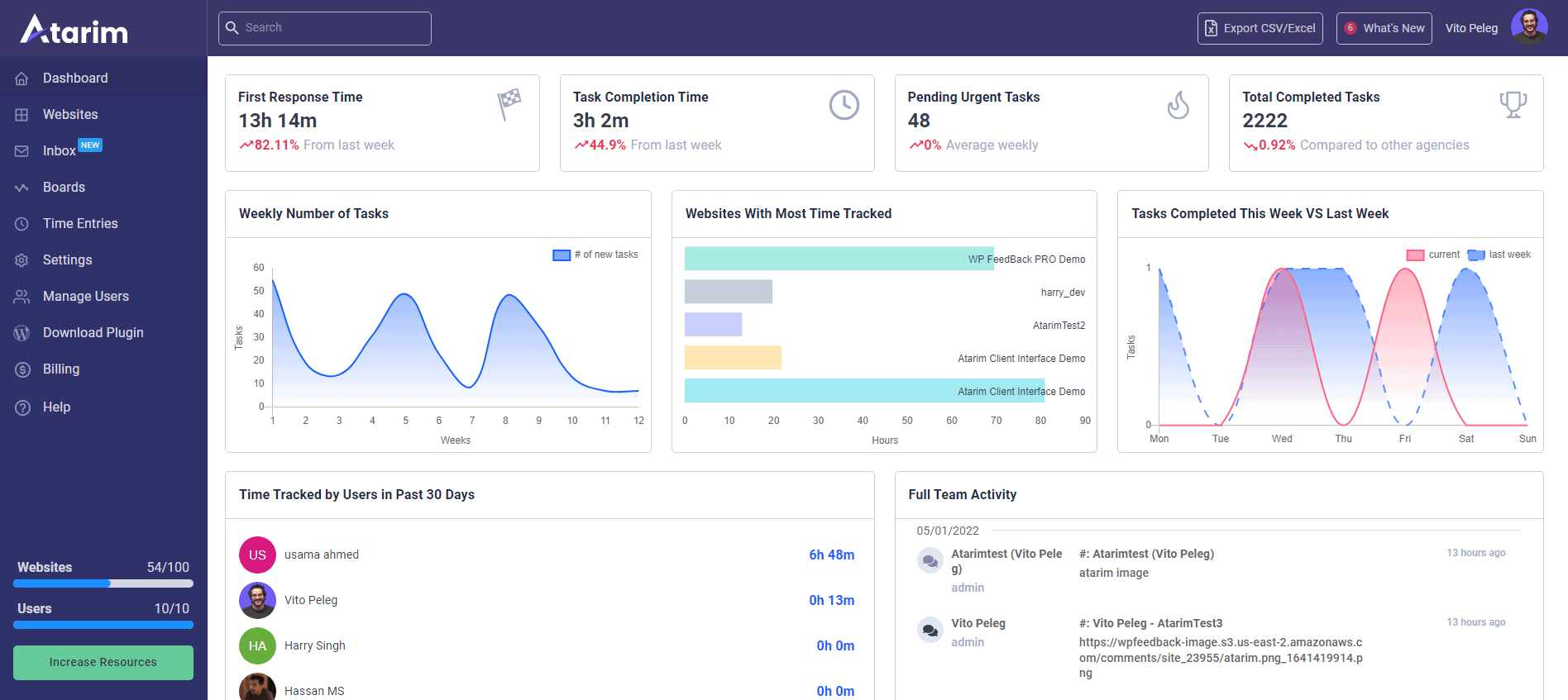
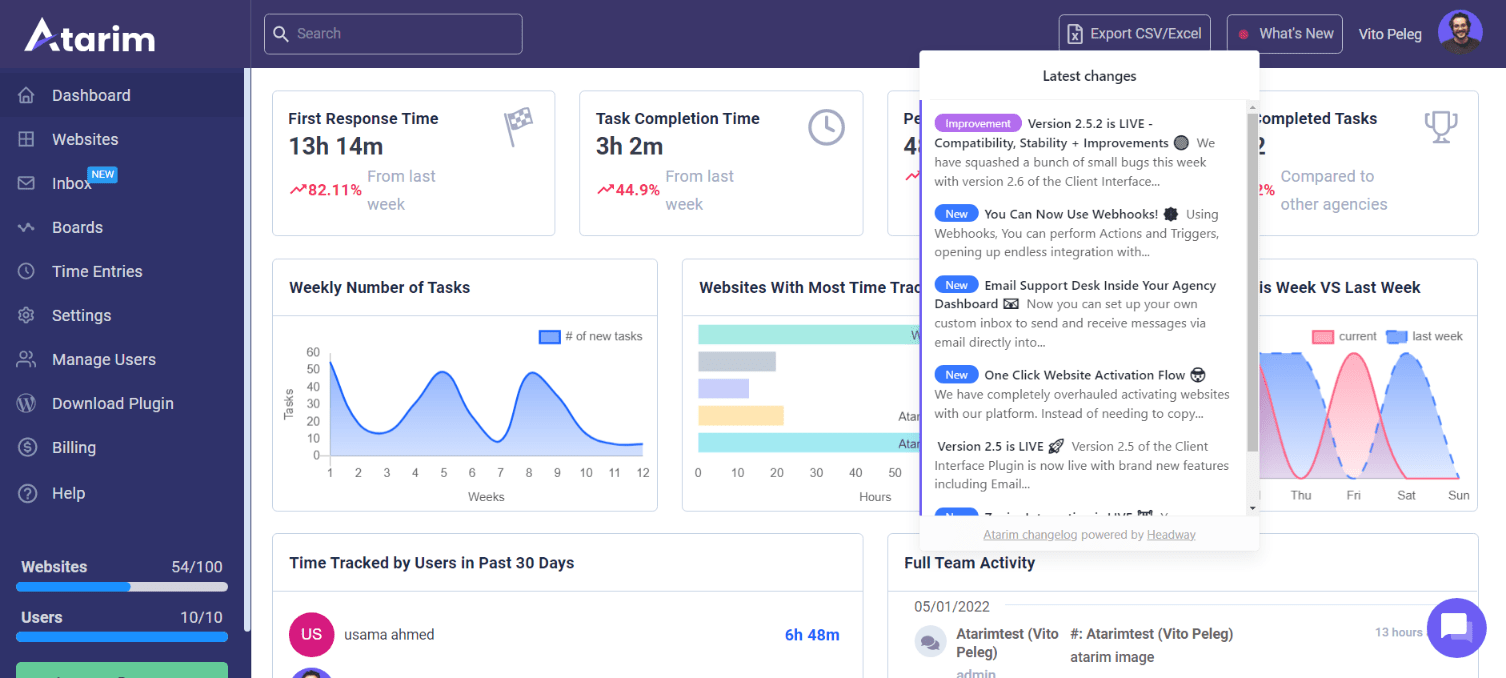
One of the key updates introduced this year is related to tracking KPIs and benchmarks. Now, you can view key metrics like:

  • First response time
  • Task completion time
  • Pending urgent tasks
  • Total completed tasks 

This gives users more granular insights into how they connect with their customers. The lower the First Response Time, the better. 

You can also see a graph of the weekly number of tasks that are assigned to different team members. You can now also see a graph that depicts the websites with the most time tracked; this will give you a better idea about which clients deserve your time more, or which ones you need to stop working with. 

You can also see time tracked individually by different team members, as well as showing you exactly what each member has worked on within a specific timeframe. 

Websites

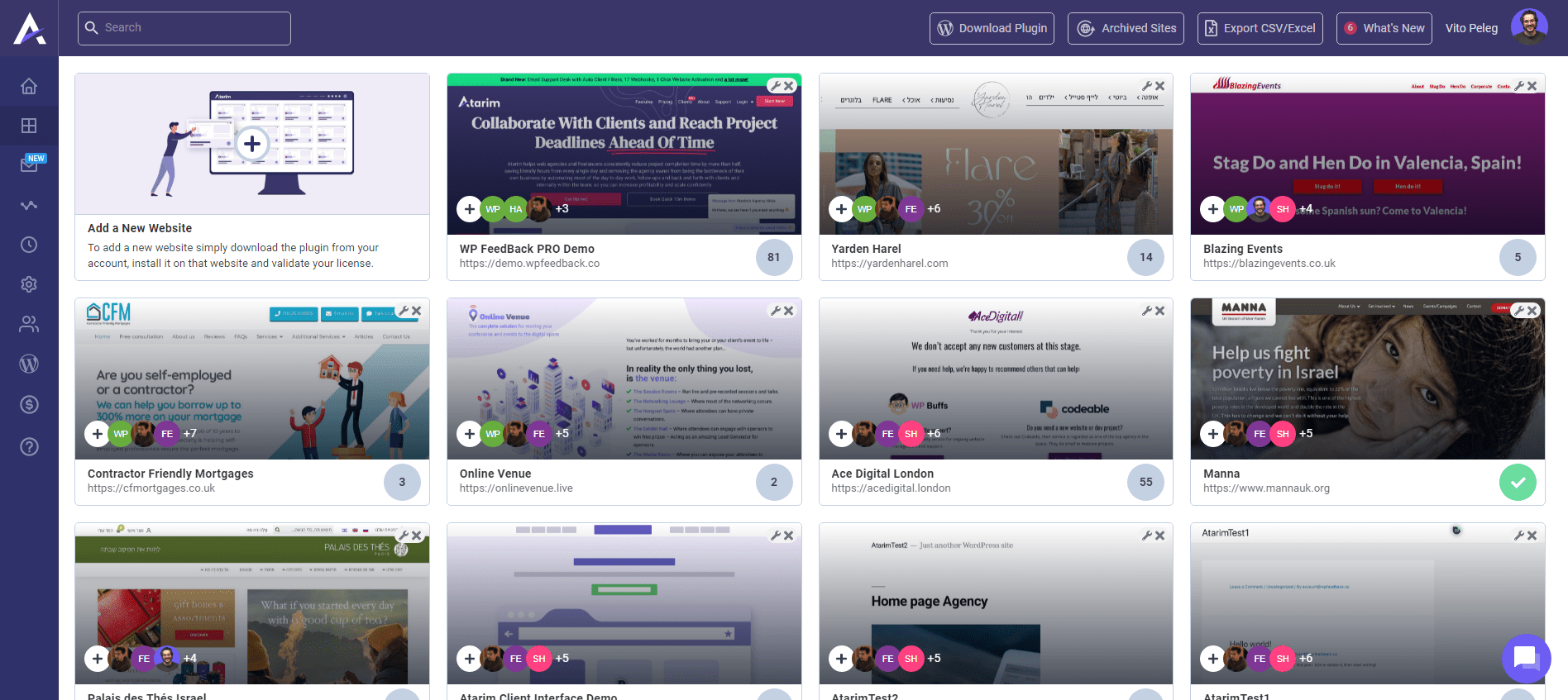
A new websites section now shows all the websites that you’re working on. Just download the client interface plugin, install it, and activate it. It can be directly downloaded from the Website section now, instead of heading to the Billing page. 

Pending tasks for each website are shown too. Once all tasks are completed, a green tick appears indicating that all work is completed.

You can also easily archive sites, and reinstate them by simply clicking on “archived sites” from the top. 

Adding users to different projects is now easier than ever before. You can assign projects to different websites, so they only see projects that they are assigned to. This reduces clutter and helps team members focus on tasks that concern them. 

Advanced Search

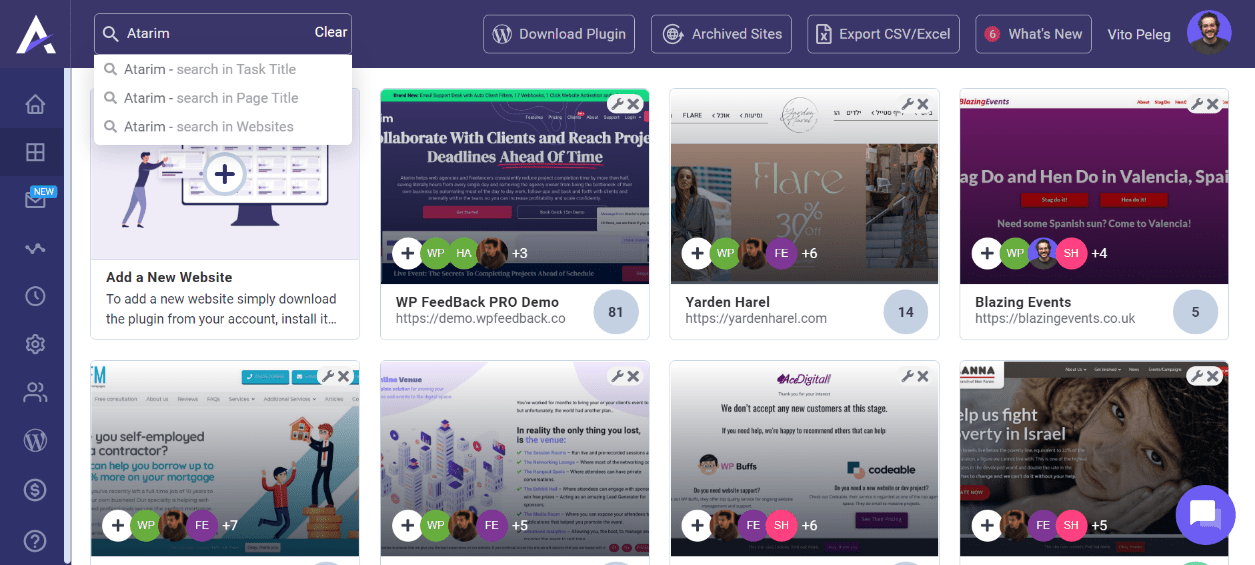
The new search bar is more enhanced, and works better than before. You can now search throughout Atarim and your different websites by:

  • Task title
  • Page title
  • Websites

We’ve also reduced the size of the Atarim plugin by a significant margin. The plugin has been compressed from 4.5 MB to under 1 MB, reducing load times to 900 ms for users that are logged in. This is very good for websites with a bunch of open tasks. 

The plugin also waits for the website to load so the HTML is in place before it loads up and assigns tasks. 

Exporting Data 

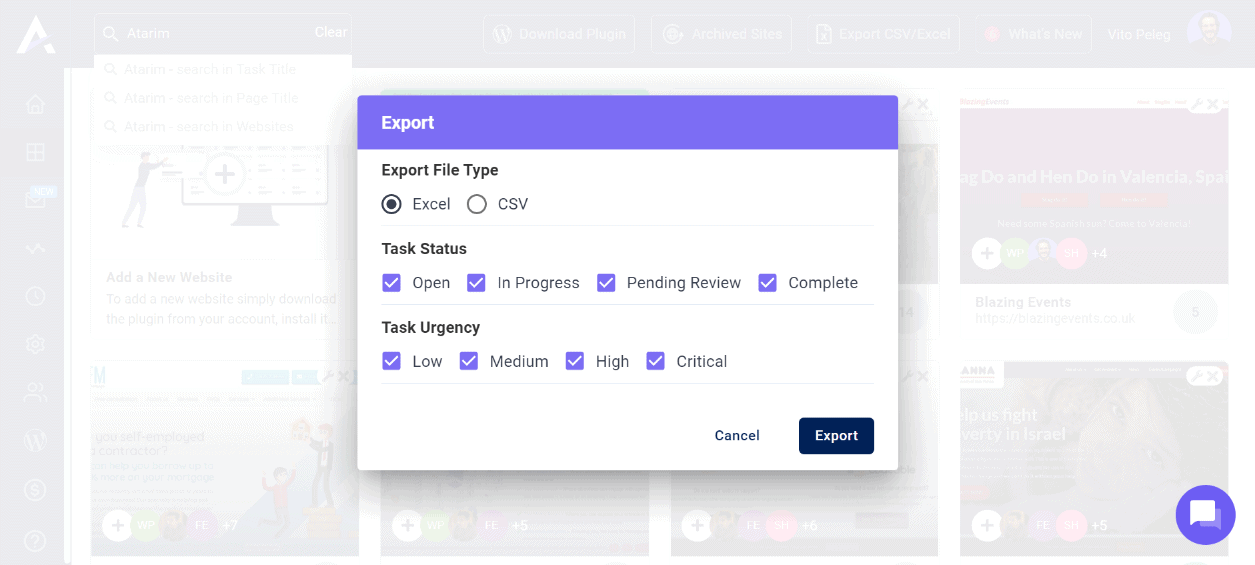
Simply click on “Export CSV/Excel” to export data from Atarim to spreadsheets. This is necessary for GDPR compliance, and Atarim is compliant.

The “What’s New?” Button

The “What’s New?” button now shows all the new features released on the platform. We aim to release one major feature, once a month! 

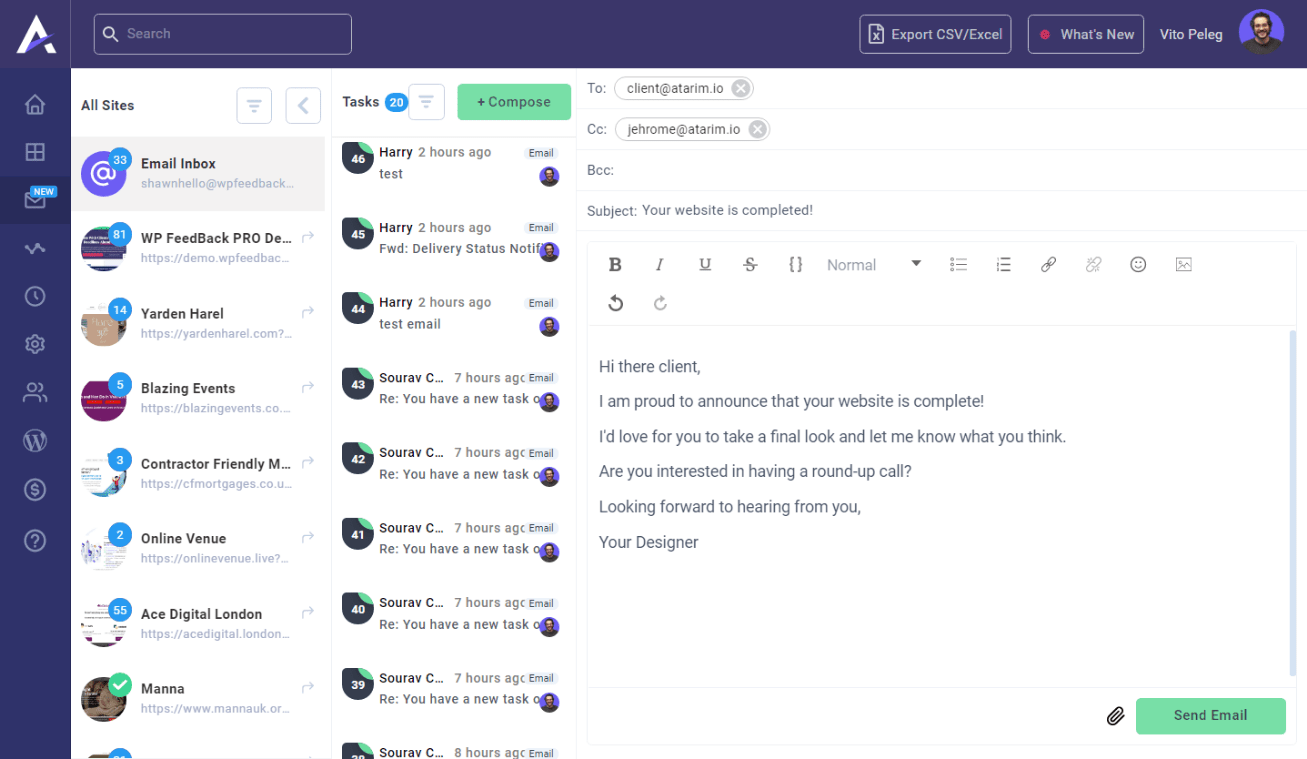
Email Support Desk

The email support desk works identical to the agency inbox, letting you send emails directly from Atarim. It’s a rich text editor, so the text can be customized however you see fit. 

You can also customize the settings to receive emails and have Atarim automatically treat them as a task. If your client’s email is associated with a specific website, Atarim automatically filters and assigns tasks from emails directly to the client’s website. 

You can also sort tasks alphabetically, done to open, and other order settings. Tasks can also be assigned to users, or you can set auto-assign too.

Auto Login

With Auto Login, you no longer need to use a password manager such as LastPass. Everything is in one place, and lets you move from one client to another without having to look for passwords.

Tracking Time Is Now Easier Than Ever

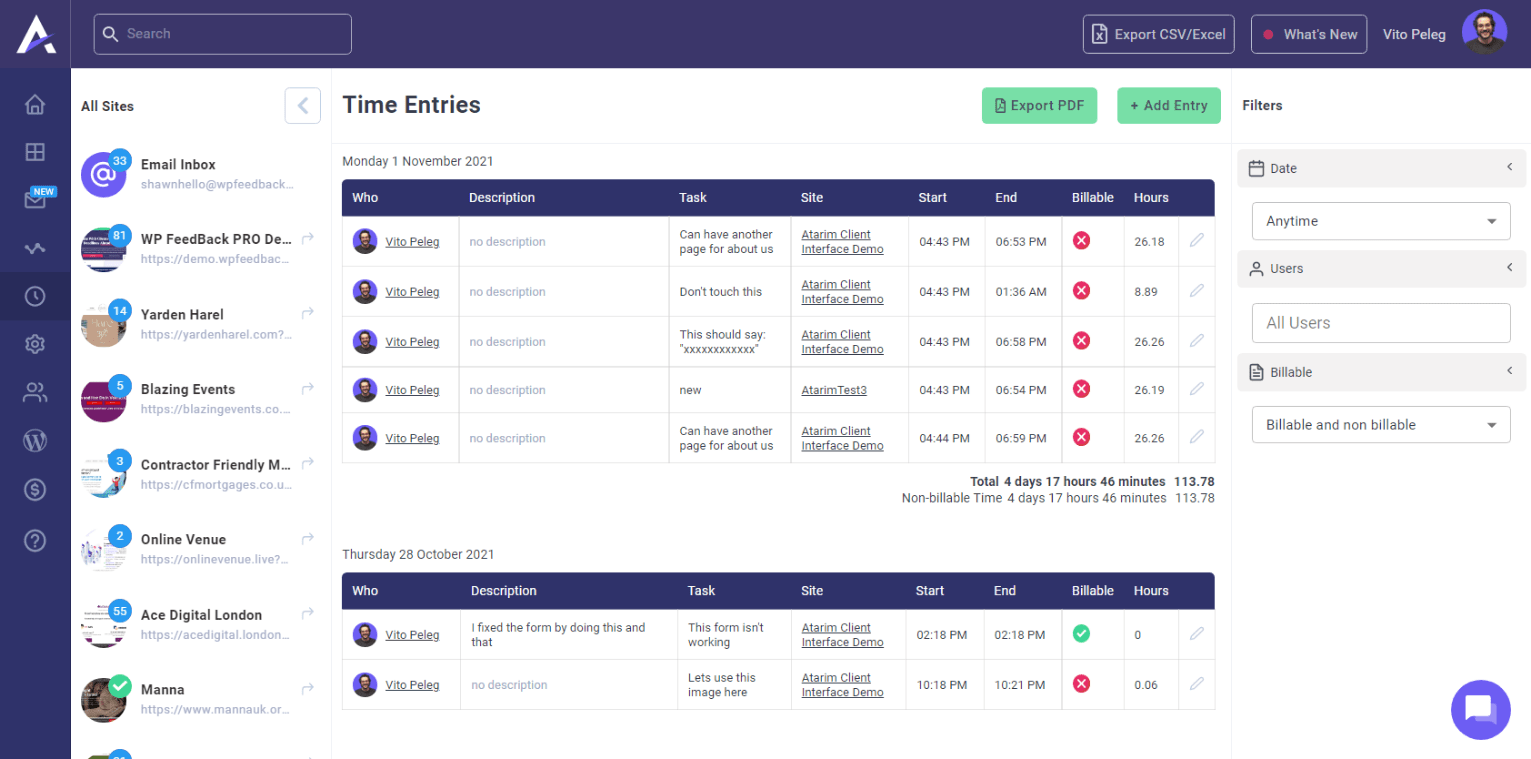
Individual time tracking is now available, with the timer running at the bottom. Estimates can be added too before beginning a task. All activity records are maintained as well. 

Task management has been greatly simplified, with a new urgent tab that lets you organize roles better. You can simply click on “Add New Task” to add a new task and briefly describe it. 

Brandable time reports are now also available. You can go into white label settings to remove the Atarim logo and add your company’s logo in the time reports. 

More filters are available to let you easily see which users have worked on which websites, as well as view billable and non-billable tasks.

Team Management

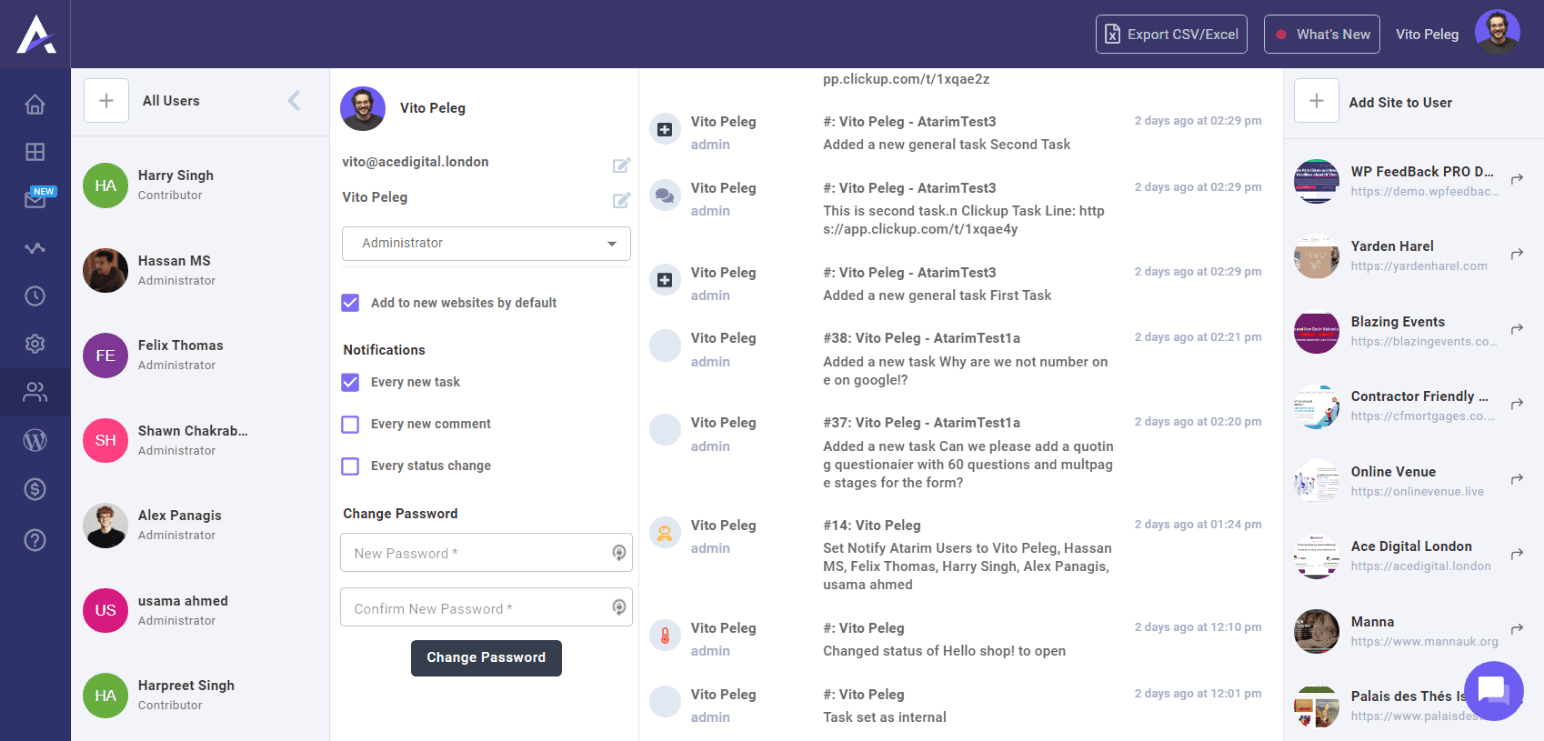
Managing team members on Atarim is also quite easy, and we’ve introduced several new features. You can now invite multiple users on the platform and automatically assign them to specific tasks. User roles can be defined too. 

This way, you can give access to users to specific websites they have to work on, instead of the entire dashboard. The activity feed, colloquially known as “God Mode,” lets the admin review all activities from all users through a centralized feed. This way, all members of your team will know that someone’s overseeing their performance. 

Using Zapier, you can now connect Atarim with thousands of other apps, including Slack, Trello, or any other that you use in your agency.

Minifying Images

We identified common pain points from our users, and tried to resolve them. Now, instead of having to download an image, minifying it using another tool, and then uploading it in the back-end, you can simply do it straight from Atarim. 

The Client Interface Plugin 

We have added email templates for inviting clients to collaborate with you on tasks. Templates are available for different stages of the onboarding process. Just head towards the Billing page, and scroll down. You’ll find all the templates there. 

We’ve also introduced a new Guest mode that enables any website user to create tasks, and comment on existing ones. 

This is ideal during the development process or in staging environments, when the website is only accessible to you, your team, and your client.

When the guest mode is enabled and the website is opened, you will see all tasks that have been generated on the homepage.

Additionally, after the site is up and your customer has been given login access, you can  disable Guest Mode and utilize the frontend login functionality. 

You can also whitelabel the login popup. When a client logs in, they can see different roles. Your client just needs to select the relevant role, and they can select the notifications they want to receive.

Users now have more control to let clients choose which notifications they can select from. A short video is available on the front-end for creating tasks, making it easy for them to understand how to use the platform. 

You can also switch to Responsive mode to view how the website will look on mobiles, and leave comments based on clients’ preferences. If you go back to the normal view, you’ll see tasks attached in the right place (even those made in mobile view).

This makes it super handy for users to see what clients want, even if they are creating tasks on their mobile phone or tablet. When clients get notified of different tasks, they will automatically be directed to a specific page, and a popup will be shown to them, letting them know exactly what they want. 

The bottom bar now shows activity progress at the bottom. White labelling also lets you add your logo and link to it at the bottom. 

Graphic Feedback Tool

The new Graphic Feedback Tool now let’s users easily collaborate on wireframes or flowcharts with others. Creating new graphic items is easy, and lets you collaborate on different blocks straight from the dashboard.

You can click anywhere on the canvas to easily add comments. Users can also change the color and design according to their preferences and collaborate seamlessly on projects. 

A static sidebar lets you filter items, search for things, and create general tasks too. 

The Roadmap for 2022

There are lots of exciting features coming to Atarim in 2022 as we close this year. As promised, we’ll be releasing one new feature each month, so you can expect lots of advanced functionality from Atarim in 2022. 

For instance, we are moving the Graphic Feedback Tool into the Agency Dashboard, and then we’re introducing a new feature that lets you open Atarim that’s open to all websites.

So, you can just add a URL for any website, and add a layer for collaborating with clients using Atarim. It’s extremely fast, letting you get started in a couple of clicks. That’ll generate a unique URL that you can share with your clients. 

Of course, that’s just the tip of the iceberg! There are a lot of interesting things to come in 2022, so stay tuned, and we wish you a happy New Year’s from all of us at Atarim!

How to Find Clients on LinkedIn (5 Minutes Per Day)

LinkedIn is a treasure trove of new leads and clients, as long as you know how to use it to your advantage.

For a majority of business owners, attracting clients on LinkedIn often feels like a serious struggle. Understanding the ins and outs of the platform often seems a bit difficult for most entrepreneurs.

However, it doesn’t have to be. By sparing just five to ten minutes out of your day and dedicating your attention to LinkedIn, you could potentially turn it into a prime hunting ground for your company.

There are several simple things that you could be doing right now to bring about a serious change in your strategy. If you have decided to take the plunge into the LinkedIn ocean and start fishing for clients, here are just a few tips to help you land your first catch quickly and find clients on Linkedin!

Target the Right Keywords (Use Boolean Search)

target the right keywords with boolean search and find clients on linkedin

Boolean searches use symbolic logic in order to find what you are looking for without having to run multiple searches. It allows the use of common operators, such as AND, NOT, and OR. It allows you to limit, broaden, or more accurately define your search parameters.

If you aren’t using the Boolean search on LinkedIn, you are missing out. It works exactly as intended, and allows you to better conduct your searches. Here are some of the options available with LinkedIn Boolean Search:

  • Quoted searches: if you run a search and add the keywords within quotation marks, LinkedIn will run an exact search for the keywords. However, you should know that stop words like “with,” “by,” and “in” are not registered.
  • AND searches: If you write AND (capitalized) and then run a search, it’ll show you all of the results from a list. For instance, if you are looking for clients in a specific niche, you could write something like “SaaS AND finance” for more accurate results.
  • NOT searches: If you want to exclude a particular search term from the results, you can use the NOT (capitalized) in your search. This will allow you to further narrow down your results. For instance, you could search for a “developer NOT designer.”
  • OR searches: If you want to see results that include one or more items, you can use the OR (capitalized) operator. This is great for getting more results from a specific niche. For instance, you could search for “eCommerce OR agency.”
  • Parentheses: You can also run a search using parentheses. For instance, if you want to find potential leads who are decision-makers in their organizations, but don’t want assistants, you can run a search such as “product managers NOT (assistant OR deputy).

As you can see, Boolean search is incredibly effective if you do it right. As long as you are able to narrow down your search results, you can eventually find relevant clients or leads that you can eventually reach out to.

Optimize Your Profile

optimize your profile find clients on linkedin

Your profile is the first thing that a potential client is going to see when they log on to LinkedIn. It is imperative that you optimize your LinkedIn profile if you want to leave a strong impression on your clients.

If you don’t leave a good impression on your clients, your outreaches will fall on deaf ears. There are several things that you can do to improve your profile and make a better impression on visitors. Let’s run through them one by one.

Use Professional Picture

professional picture on linkedin

One of the best ways to create a strong impression on potential profile visitors is to use a good profile photo. It always pays to hire a professional to take a few headshots that you can use for your LinkedIn profile.

Using the same photo that you are using on Instagram or Facebook is absolutely not recommended. A professional profile photo shows that you are willing to make the extra effort to impress prospective clients. Here are some good practices to follow when selecting a LinkedIn profile photo:

  • Always choose a clear, high-res image.
  • Choose a photo in which your face takes up 60% of the full frame.
  • Never choose group photos. You should be the only person in the picture.
  • Always use a smiling photo. The right expressions can make all the difference.
  • Always choose a photo with a clear background.

Spending some money on hiring a professional photographer to take a few pictures of you in the studio can actually have a good ROI!

Curate Your Best Content

curating best content on linkedin

Daymond John, the man behind FUBU and one of the mainstays on Shark Tank, regularly updates the “Featured” section on his profile. He’s a millionaire, but he always curates and presents his best content on the platform.

If such a successful person does it, you should too. By curating your best content on your profile, you will improve your authority and your reputation on different topics. If you are approaching clients in a relevant niche, this could work wonders for you.

Add a Professional Heading

professional linkedin heading example

A professional, relevant headline goes a long way in improving your profile and the impression it leaves on visitors. When creating a headline for your LinkedIn profile, don’t just go with another common one like “Product Manager” or “Marketing Executive.”

Instead, your headline should focus on your target audience, what you can do for them, and how your contributions can solve their problems. For instance, if you are a content marketer working with digital agencies, your headline could be something like:

Helping digital agencies improve content reach and defining user journeys to improve brand awareness.

Add Keyword-Optimized Summary

keyword optimized summary on linkedin profile example

A properly optimized LinkedIn summary with the right keywords can go a long way in leaving the right impression on potential clients. You already know that keywords play an important role in how LinkedIn categorizes profiles.

Using industry lingo and experience-based vernacular can go a long way in leaving the right impression on your audience. Don’t just restrict keyword usage to the Summary section – sprinkle them throughout your profile!

Add a Bullet Summary Job Description Under Each Experience

bullet summary job description on linkedin example

Instead of writing overly long paragraphs detailing your job experience, try to make it short and relevant by adding bullet points. This is an excellent way to make your profile more scannable and to ensure that relevant information is highlighted at a glance. 

By adding a bulleted list, you make it easy for profile visitors to get all the details they need about your accomplishments and successes in seconds.

Regularly Post in Groups and Engage with Others

regular post in groups to find clients on linkedin

To further enhance your authority and credibility within a specific niche, it’s imperative that you start using LinkedIn on a regular basis. By regularly posting in groups, engaging with others’ posts, and initiating discussions on relevant topics, you can easily gain more connections.

Equation is simple:

Engaging with others = better reach = more connections = more leads

Unlike other social networks like Facebook, LinkedIn is used primarily for business purposes, so when you post something, expect a relevant, serious response. Groups on LinkedIn are a great way to engage with new prospects and to share insights into your own work. 

If you are active in different groups on the platform, it’s also going to help improve your SSI (which we’ll get to a bit later).

Build Your Ideal Client Persona

building ideal client persona

Before you start targeting clients on LinkedIn, it’s important for you to build an ideal client persona. Think of the persona as an archetype that you can create to determine the ideal customer for your company.

Adding psychographic details to the persona is very important, as it helps you identify clients who would be the best fit for your services. For instance, if you are offering services within a specific region, your ideal client persona would be people within that region along with other attributes your business model requires.

There are several questions to ask yourself when building an ideal client persona. Here are a few:

  • What are your audience’s main demographics?
  • Where does your audience do its research before shopping online?
  • What are the main pain points that your audience faces?
  • How does your ideal client wish to interact?
  • What are their daily workflows like?
  • What would be the ideal time to engage with them?
  • How much are they willing to spend on services like yours?
  • Are they seeking long term collaboration or project-based work?

All these questions will help you build a perfect client persona which will furthermore help you optimize your advertising strategies and the hunt for new clients as you’ll know exactly what you’re looking for.

The downside of not building an ideal client persona is that you might end up becoming a universal Yes-Man which often ends up in you investing all your resources for a very small to none benefit. So make sure to build your ideal client persona!

Work on Improving Your LinkedIn SSI

linkedin ssi result

As a platform, LinkedIn was designed primarily for social sellers. It’s an excellent place to find new clients if you are great at conversations and are really good at what you do. If you are using Sales Navigator (as you should be!), you might already have an idea about the LinkedIn SSI. 

For those who don’t, the LinkedIn SSI is simply a metric to track just how good you are at social selling and execution. It’s known as the Social Selling Index, and it’s calculated based on four factors:

  1. Your professional brand – is your profile completed with your ideal client persona in mind? 
  2. Find the right people – have you connected with the right people who are relevant to your industry?
  3. Engage – are you sharing updates that are worthy of discussions to build new relationships on the platform? 
  4. Relationships – are you actively looking to build new relationships with decision-makers in your industry? 

As shown above, social selling goes a long way in helping you increase your sales. You can check your LinkedIn SSI and get tips from the platform on how to improve it. The more you engage and participate on the platform, the better your score will get. 

Outreach

Now that you optimized your profile fully, increased your engagement and SSI score, it’s time to actually take steps to find clients.

Sure with all the steps previously completed you will have a much bigger chance of clients finding you but bear in mind that others are also hustling and reaching out to potential clients even they already have optimized profiles like you. Knowing that it’s a logical assumption that you’re missing out on finding new clients if you’re not doing the outreach!

Outreach can be a super boring and monotonous process, but the key is actually making personalized messages to potential clients.

If you send something like:

“Hey [NAME],

I’m John Doe and I have a marketing agency and I can help you grow your business, let me know if you’re interested”

…you won’t be getting much response from people you reached out to.

So if you find a person you think your services may improve their business personalize the message to them. Some things you should include in your message:

  • Their actual name
  • What are they missing out on that you noticed
  • How you and your service can resolve that
  • How much you can help them grow
  • CTA

Here’s an example of a good-converting outreach message:

Hey [NAME],

Thanks for accepting my connect request!

I wanted to reach out to let you know that I dug a bit around your website as your service/software seemed very interesting (might be actually useful for my XYZ reasons!).

As I’m an SEO expert with 5 years of experience, I couldn’t help but notice that your blog posts aren’t reaching their full potential – you have good topic ideas that may get you a ton of traffic, but there’s a lot I see that you’re actually missing out!

Here’s a friendly tip: When covering a topic and writing a blog post, try to think like the reader — what questions would they actually have about your topic? Also, make sure that the structure is actually getting the reader step-by-step through the story and not skipping any steps!

I know this may seem like a lot of work, but I’m sure your readers and your business will be thankful!

Also, if you’re not sure how to get the most out of your blog feel free to reach out — my agency has some incredible solutions that I’m sure would be out of great benefit to you and your business! We can schedule a call or simply consult here!

Let me know!
Thank you,
[SIGNATURE]

With this method, we’re pretty certain that potential clients you reach out to will convert much better, and if not, at least they will know who you are and that you dedicated time to give them a friendly tip!

So in summary, here’s the formula:

  1. Express gratitude for connecting with them
  2. Let them know that you’re familiar with their business
  3. Let them know about a few issues they currently have
  4. Give them a friendly tip on how to solve the problem
  5. Plug in your services 
  6. CTA

We admit, this isn’t really a 5 minute per day thing, but sending one of these per day will cost you no more than 20 minutes. Another good thing is to consider hiring an outreach manager to do the heavy lifting for you.

Now that you know how to contact potential customers, happy outreach!

Advertise

Linkedin offers advertising as an option as well, and you can actually find a lot of clients if you’d rather invest the money instead of time spent on outreach.

They have multiple advertising options and you can get more information on their Linkedin advertising landing page.

Linkedin Ads are far less complicated than Facebook/Instagram ads and Google Ads, yet they can actually convert far better, especially when it comes to the B2B industry.

The best thing about Linkedin Ads: they actually are 5 minutes per day!

Wrapping Up

If you do it right, LinkedIn can be a fantastic place for you to get new clients from. Since its acquisition, LinkedIn has become an excellent platform for sales professionals and entrepreneurs looking to promote their services. 

By spending just five minutes of your time each day working to improve your LinkedIn presence, you will notice a considerable uptick in the number of leads you generate through the platform.

How to Write Killer Web Design Proposals That Close Deals

As the owner of a web design and development agency, you need to wear many hats during the day. One of the things that you need to be really good at is writing web design proposals. A great web design proposal requires considerable thought and effort.

Unfortunately, most agency owners simply don’t have the time or the understanding of how to write a proper web design proposal. Web design proposals are generally quite tedious, and the process can get repetitive. Then, there’s the uncertainty; you don’t know whether your effort will be rewarded or not.

There’s little doubt however that a professional, well-written web design proposal can help you close deals. It’s a skill that every agency owner must master if they wish to succeed in a competitive landscape.

Here’s what we’ll cover:

What is a Web Design Proposal?

A web design proposal is a simple document sent by a web designer or agency owner to a prospective client. The web design proposal is broken down into several sections and serves as a roadmap that outlines the scope of the project, the deliverables, timeline, and other details.

Both the client and the web designer can refer to the document to ensure that they stick to the original agreement. It’s important to understand that web design proposals are not contracts. They are not legally binding, so changes can be made if both parties agree to them.

7 Key Sections to Add in a Web Design Proposal

High-converting web design proposals usually have a few common features. After carefully analyzing several web design proposals, we have identified several key sections that should be added to web design proposals to make them stand out.

1. Introduction

The introduction is your chance to create a strong impression. Remember, the main aim of a web design proposal is to let clients know more about you and the value you bring to the table.

If you intricately go into excessive detail, your clients will never run through the entire proposal. The introduction of your web design proposal should include key details, such as:

  •  Name of the client
  • Your name
  • Title of the web design project
  • Your contact details
  • Company logo (if you have one)
  • Submission date

Don’t start off by focusing on the problem right off the bat. Let the client know who you are, how much experience you have, and why you are a good fit for this job.

2. Highlighting the Problem

After you are through with introductions, the next step is to identify the problem faced by the client. Remember, you need to take a very analytical approach for this section. This is your chance to let the client know about what they are missing.

It could be a glaring issue in their overall UI or UX, or it could be an improvement over their current decision. The problem statement needs to be worded very carefully; it must be really specific to the business’ needs. Don’t write something generic and open-ended.

It’s about creating a rapport with the client and letting them know that you have put in an effort when creating this web design proposal. This is your chance of letting the client know that they’ll be in good hands if they choose to go with your proposal. You need to be as thorough and as specific as possible in this part.

Write in a way that it brings out your knowledge as well as explains to the client why you would be a good fit for the job.

3. Presenting the Solution

Once you have outlined the problems in the previous section, it’s time to provide the client with the right solution. Take your time to study the company’s stakeholders, the nature of their work, and the problems that they have been facing. Try to figure out why that is the case, and what you can do differently.

It’s imperative that you use business language and industry-specific jargon throughout your business proposal, but even more so in this section. If you are pitching a new design to the client for a landing page, try to add more value by letting them know how this design is an improvement over their previous ones.

Try to figure out what the client might be looking for from any previous conversations you’ve had, and then use that to present the solutions to the problems highlighted in the previous section.

4. Detailing the Project

Once you have offered the solution, it’s time to let the client know exactly how you are going to solve their problem. This is the section where you detail every part of the project. Most web design projects are generally divided into several phases, including wireframes, extensive discussions, graphical design pitches, writing code, and a lot more.

This section will serve two purposes:

  • Let the client know exactly what you are going to do for them.
  • Mitigate scope creep.

Scope creep is perhaps one of the biggest issues faced by digital agencies around the world. More often than not, clients might require you to do something extra, and not pay for it. That is one of the reasons why you need to be as meticulous as possible when writing every stage of the project.

Explain all the major processes, and let the client know about each and everything that you will do for them. Ideally, all the deliverables should be listed in chronological order. It’s best to cover each and everything during this part.

5. Tentative Timelines

Right after the previous section, you should add the tentative timelines and schedule for the work. This includes dates for when you can expect to receive important documents, approvals, prototypes, corrections, comments, and other forms of feedback.

This is also the section where you will expand on the deadlines for the work to be delivered. These are generally tentative, but they do give a clear idea to the client about when they can expect delivery.

More importantly, if you send a design for corrections and they do not respond, you will be in the clear. Make sure to set reasonable deadlines based on the resources you have in the house.

If you are going to outsource certain services, do mention that as well.

6. Setting Milestones and Pricing

This is arguably one of the most important parts of the entire web design proposal. Ideally, you’d want to know what the client’s budget is during your initial interview. This will make it easy for you to understand whether the client is worth all the trouble or not.

This is the section where you provide a detailed cost breakdown for the work. This should link to the fourth section, where you highlight all of the services that you’ll be providing. Against each service, you should write the cost value, so the client knows how much they will have to pay.

Try to be as accurate as possible, but don’t go overboard with too much detail. Also, don’t be unreasonable with the pricing. When offering the quote, make sure to stay competitive with the pricing.

It’s also important that you write the milestones when you expect the payment. Will you take the full amount in advance? Or, will you give the client the option to break down the fee into different payments? It’s best to write the dates when payments will become due.

7. Terms and Conditions

You will obviously want to avoid any misunderstandings with the client. If there are any terms and conditions that you’d like to set before the project gets underway, this is the section to add them in.

For instance, it would be wise to mention here that in case communication or feedback is delayed from the client, it will affect delivery dates for the subsequent milestones. Also, write about the rights to intellectual property, and any terms regarding the payments.

4 Elements to Really Make Your Web Design Proposal Stand Out

Once you have incorporated all of these sections in your web design proposal, it’s time to add the icing to the cake. Here are four elements that will make your web design proposal stand out from the rest.

1. Reliable Pricing

Pricing is a major concern for most people. In the post-COVID economy, businesses are looking to cut costs. When adding the prices for each service, make sure it’s accurate. If you have mentioned a really high amount for something, in particular, it’s best to write a brief explanation about it.

Reliable pricing will go a long way in helping you convert clients. Remember, most clients aren’t looking for the cheapest option; they want someone that’s dependable and offers value for their money.

2. Asking Questions

You will have to ask questions from the client when preparing the web design proposal. If you have a list of questions that might affect the quality of a particular service, write them down in the proposal. Let the client know whatever information you will need for specific services.

Make your questions as specific as possible, so that you have a clear idea about what the client wants. It’s best to ask relevant, specific questions related to the scope of the project. Here are a few that you might want to ask the client:

  • What do you expect from your new website?
  • Why do you require a new website design?
  • What role does your website play in your overall digital marketing strategy?
  • Do you expect to interact with the visitors on the site?
  • What are the main competitors in your niche?
  • Do you have any inspiration that you’d like to share?

All these questions will help you build a better web design proposal, so make sure to include them!

3. Evaluating Resources and Planning for the Project

When you start writing the web design proposal, you should have a clear idea in your head about the resources that you’ll have to allocate for each section. If you are outsourcing certain parts of the job, do consult with the outsourcing company so that there are no untimely delays. You need to determine whether:

  • An outside expert or consultant needs to be brought on or not.
  • Any plugins, software, or hardware needs to be purchased.
  • Availability of team members
  • How this project will affect work on other projects.

4. Aligning Expectations

Lastly, it’s important that you learn how to align the client’s expectations with yours. Good web design is only possible through a collaborative effort. Let the client know their role in the whole process, and where they will be asked to chip in. For several important decisions, you will have to refer to the client time and again.

You can’t expect to keep changing designs just because the client doesn’t “like it” or wants “something fancy.” You will want their input in the design process, so it’s important that you let them know about this as well.

Conclusion

Writing a high-converting web design proposal is difficult, but not impossible. It takes time and effort, but once you have a template in place, the process will eventually get easier. This way, you won’t have to start from scratch every time you have to send a proposal to a client.

Make sure your web design proposal has a clear overview of the problem and the solution. Include details about the work you’re going to provide the client with and make sure you set clear deadlines, milestones, and pricing. Also, have terms and conditions of your operations ready, as that will protect you if awkward moments come up.

With all this, we’re certain that your web design proposal will convert and get you plenty of new clients!

Related: And if you’re putting together your proposal based on a client site that really could use some work, this guide from our friends over at WPMU DEV covers the ways to go about this.

How To Design Effective Landing Pages That Convert (With Examples)

Landing pages are a critical part of the sales funnel. They nudge users along the funnel and are designed to increase conversions and signups. The reason why it’s called a landing page is that it’s designed for users who “land” on the page through an email campaign, an external ad, or some other source of traffic.

When you create a landing page for a client, the discussion will eventually veer towards conversion rates. If you pour hours and hours into a landing page design, but it fails to increase conversions, what’s the point? Creating high-converting landing pages is not an exact science; it’s an art.

It requires a careful understanding of your audience, and where they are coming from. Generally, people will visit your landing pages either from organic search results or via a marketing campaign. They are interested in what you have to offer but need a bit more information.

So, the entire purpose of the landing page is to convince the user to pull the trigger. It could be used for lead generation, or for getting more signups or conversions. Here are 10 key elements to integrate into your landing page design if you want to increase conversions.

Table of contents:

  1. Start With a Catchy Headline
  2. Attention-Grabbing Graphics
  3. Well-Written Copy
  4. Identify & Highlight Pain Points
  5. Add The Video
  6. Rigorous A/B Testing
  7. Social Proof
  8. FAQ Section
  9. Clear Offer
  10. Enticing Call To Action (CTA)
  11. 5 Examples of High-Converting Landing Pages
  12. Conclusion

1. Start with a Catchy Headline

slack landing page design catchy headline

A catchy headline goes a long way in convincing people to stay on the landing page. Essentially, a catchy headline is designed to grab the viewers’ attention right off the bat. It resonates with them, and it’s designed to stick in their minds even after they close the website. 

This is the first thing that a user will see when they land on your page. Only 2 out of 10 users will ever bother reading the copy on your landing page, so the heading needs to be really intriguing.

There are several kinds of headlines that every writer should know about. These include:

  • Kicker headlines – designed to provoke interest
  • The “How-To” headline
  • The Incentivized headline – see the example below
  • The Problem Headline – “Tired of X? We have a solution!”
  • The Call to Action – designed to convince users to act

Here’s an example of an incentivized headline:

incentive headline example landing page design

Remember, the person is already interested in what you have to offer; they just need a bit more information!

Here’s a simple formula that you can use to come up with a catchy headline:

  • Check your competition
  • Do the keyword research
  • Write at least 5 creative variations of the headline 
  • A/B test your headlines carefully to determine what works and what needs to be ditched
  • Don’t write overly long headings.

2. Attention-Grabbing Graphics

elementor attention grabbing landing page design

The graphics you use on the landing page design play a bigger role than you might think. Visitors on the site aren’t exactly interested in reading batches of text; they are more concerned with how it’s presented. Using graphics to drive your point will resonate with the user much better. 

For instance, the screenshot above is from Elementor, and they use graphics very effectively to highlight how their product helps digital agency owners. Their landing page for agencies is riddled with graphics and designs created using Elementor, thus adding value and showcasing what the product is all about.

As the name suggests, attention-grabbing graphics are designed to immediately hijack the viewers’ attention. They often feature a conceptual twist designed to invoke a surprise reaction, and usually target the way people perceive different images. 

In order to create interesting graphics, you need to create links between the thoughts in your viewers’ minds. It should link closely with the copy too. Ideally, you will want to work with a graphic designer to come up with such imagery. 

However, that doesn’t mean you can’t design them on your own. Here are a few resources that you can use to create attention-grabbing graphics:

The best way to use these graphics is to link them closely with the headlines. You’re taking your visitors on a journey, so it’s important that you establish a link between the graphics and the content, as shown below.

attention grabbing landing page design example

3. Well-Written Copy

mailchimp landing page design well written copy

When writing copy for your landing pages, always focus on presenting the value in as few words as possible. If you take a look above, MailChimp has written excellent copy for their personalized email builder. They highlight the pain point and then present the solution.

It’s simple, it’s effective, and above all, it highlights the value addition perfectly. Landing page copy should touch on your users’ pain points, and address them to the point. There’s no reason to beat around the bush. 

Here’s how to write good copy:

  • Do the keyword research and include focus keywords and secondary keywords.
  • Write as you talk.
  • Highlight the pain points (exaggerate the common problem)
  • Present the solution of the problem through your product
  • Think “What’s in it for the user?”
  • Make sure to include all benefits of having your product
  • A/B testing!

Well-written copy doesn’t have to exude style. It’s essentially copy that builds trust, showcases authority, and above all, encapsulates the value you offer briefly. The best way to write a good copy is to use the 4Cs formula: make it clear, concise, credible, and compelling.

mailchimp well written copy example of landing page design

Another way to write good copy is to tell a captivating story. If it resonates with your audience, they’ll be hooked!

However, many people make basic mistakes when writing copy.

Here are a few mistakes that you should avoid at all costs:

  • Not proofreading your copy.
  • Not adding a clear CTA. 
  • Focusing more on the product instead of the value it offers.
  • Deviating focus
  • Not writing catchy headlines

4. Identify and Highlight Pain Points

shopify landing page design example of pain points

Shopify is a hosted eCommerce platform that gives its users all the tools that they need to launch an online store. It takes away the hassle, allowing users to employ simple drag-and-drop techniques to create and launch their store.

They understand their market very well, and they know their users’ common problems. That’s why their landing pages almost invariably start by identifying and highlighting their users’ pain points and then present the solution.

Here’s another great example of a landing page where the creator is highlighting pain points and providing solution right away:

course landing page example of pain points

A pain point is simply a common problem experienced by your audience. Knowing pain points is important because it allows you to position your offering as a prospective solution.

Here are five examples of pain points from different industries:

  • Delayed response from support teams
  • Overly complicated sign-up processes
  • Inconvenience in using a particular service or product
  • Excessive time is taken to complete simple tasks
  • Information not readily available.

To find your customers’ pain points, you need to first develop a sound understanding of your audience in general. You need to know the main issues that lead to friction, and how to resolve them.

jarvis pain point landing page design example

This point ties closely with the previous one; you can’t write good copy if you don’t touch on your audience’s pain points and identify the solutions they want. Make sure you create a link between the two.

5. Add The Video

atarim landing page design

Adding a video on a landing page is another effective way to reduce bounce rates and get people to convert. Landing page videos are ideal for highlighting the features and presenting your product in an informative and engaging way.

If the conversions from your landing page don’t meet your expectations, adding a landing page is a great idea. You can either add a brief video that explains the main features of the program or service, or, you can create an explainer video highlighting the problem, and the solution you offer. 

When done correctly, videos on the landing page can definitely increase conversion rates. However, just make sure that you don’t add an overly lengthy video. You don’t want the video to be more than 2 minutes, tops.

Here’s the most effective video structure that you can use on your landing page:

  • A brief introduction – Here, you can talk about how you came up with the idea of the product or service. Keep it short. 
  • Pain point – Elaborate on the pain points of your audience. If you were experiencing a similar problem, highlight that too. Don’t spend too long highlighting problems.
  • The solution –  This is the most important section. Run through the features and benefits. This should take up most of the time. 
  • Conclusion – End the video with a logo of your company and the CTA. 

Visual effects play an important role, and people are generally more interested in watching things instead of just going through the text. An average human has an attention span of around 8 seconds, which is less than a goldfish!

wistia landing page design video example

When creating a video, don’t just have someone stand before a camera and talk about the features. You need to show your users how the product can help. 

Here at Atarim, we do this to great effect; we highlight the main features of our agency management software, letting viewers run through the main benefits through a video clip. 

Also, you don’t want the video to be overly long, because nobody will stick around for 5-10 minutes to watch a presentation on a landing page.

6. Rigorous A/B Testing

ab testing for best landing page design

A/B testing is essential if you want to know what works and what needs to be removed from your landing pages. Known commonly as split testing, this is a process where you test two versions of the same page on different audiences, and then see which one works.

Also known as split testing, this is just a randomized way of testing two or more variants of a landing page, or specific elements on the landing page. A/B testing can help you figure out which landing page your audience likes more. You can A/B test almost any element on the landing page, including:

  • Copy
  • Pictures
  • Headlines
  • Folds
  • Icons 
  • Headers
  • Pop-ups
  • Videos

There are mainly three types of A/B tests, including:

  • Standard split testing – comparing two different designs
  • Multivariate testing – similar to A/B testing, except a higher number of variables are tested
  • Multi-page testing – changes are made to several pages, instead of just one

There are plenty of tools that you can use to conduct A/B testing. Common examples include Google Optimize, Freshmarketer, and CrazyEgg. In fact, one of the biggest examples of effective A/B testing was set by Google, when the company famously tested 41 shades of blue to see which one performed better!

If you have invested a considerable amount of time and effort in creating a landing page, you also need to know whether it’s good enough or not. That’s why A/B testing is so important.

Successful marketers rigorously use split testing to remove elements that don’t resonate with their audience. It ultimately helps them build a landing page that’s primed for maximum conversions.

Bear in mind that you will need good traffic on your landing page in order to execute proper A/B testing, as without the traffic the data you’ll get will not be trustworthy.

7. Social Proof

marketerhire social proof landing page design example

MarketerHire uses social proof on their landing page to increase conversions on their landing page. They have logos of all the big brands that have used the platform, and then some personalized quotes from people who have reaped the benefits of their services.

Social proof is simply a phenomenon where people tend to copy the actions of others. If you add testimonials on your website from others, it’ll probably encourage more people to give your product a try. The most common types of social proof include:

  • Case studies
  • Testimonials 
  • Reviews on multiple platforms
  • Trust badges and icons

There’s little doubt in the fact that social proof works. When a user is on the fence about whether to sign up or not, social proof can sway their decision in your favor. It shows them that your page isn’t just full of marketing claims; there’s actual weight behind what you have written.

One mistake to avoid is to use fake social proof on your landing pages. You really don’t want to do that. Here’s why:

  • Real audiences can identify fake social proof very easily,
  • It’ll shred your credibility with your audience,
  • It’s illegal,
  • It’s just not needed.

If you want social proof, just approach your customers via email or through any other channel, and ask them to write a couple of lines about their experience. You can also use software to get social proof, such as:

  • WPForms
  • TrustPulse
  • OptinMonster

Here’s how we use social proof on our website: 

atarim social proof example

Sharing real experiences from real customers is always an excellent discussion. It helps build trust, and it shows that you value your clientele.

8. FAQ Section

faq example landing page design

Adding a bunch of FAQs at the bottom of your landing page is also an excellent way to increase conversions. Prospects won’t always bother contacting you on live chat or sending a message. If you are able to provide an answer to a potential question right on the landing page, that will most definitely increase the conversion! 

You need FAQs on the landing page so that your viewers have all the information they need before they decide to convert. Ideally, you don’t want the FAQ page to contain more than 10-15 questions at most. To save space, you might want to create drop-down FAQs as shown above. 

It may not seem like it at first, but creating an effective FAQ page can help increase conversions, especially amongst customers who are on the fence about whether to buy or not. The purpose of the FAQ is essentially to provide all the relevant information to your audience before they decide to buy your product or service.

Here are a few tips to create a well-rounded FAQ page:

  • Make a list of your customers’ most frequent questions. 
  • Conduct surveys to find out what confuses most customers. 
  • Analyze your plans to figure out what information you haven’t added.
  • Write questions based on your findings, and answer them in a succinct manner.
Go Daddy faq example

It shows that you are thoughtful and care about what your customers have to say. By now, you should be able to identify a sort of trend with all of these tips: present all the information that your users might need in a concise manner.

That is the core purpose of the landing page; to paint your product or service in a good light and highlight the need for it. Each element (and its positioning) must be carefully thought out. It should be presented in a sequence, which will eventually lead to a conversion. 

Ideally, you’d want to position your FAQs at the end of the landing page and follow it up with a CTA.

9. Clear Offer

backlinko landing page design

Take a look at the landing page above. It doesn’t get any clearer than this, does it? When designing your landing page, don’t forget the star of the show: your offer. Why would someone be interested in giving you their email address? What’s in it for them?

Try to keep your offer as simple as possible. If you are offering a discount, mention the amount. In the screenshot above, Brian mentions that the tips are “only for email subscribers.” He specifies the audience, with the offer being “exclusive SEO tips.” 

Ideally, you’d want to repeat the offer at least 3-4 times on the landing page. Try to exaggerate the offer by highlighting the opportunity cost – what the user is missing out on if they don’t convert.

offer example landing page design

You need to drill down on the point repeatedly, but make sure you present it in a clear, concise manner, right off the bat. People like being given information quickly on the web. They don’t like having to scroll down to find what’s in it for them. Don’t make them wait!

10. Enticing Call to Action (CTA)

cta example landing page design

ConvertFlow’s landing page adds the CTA smack dab in the middle, and it efficiently outlines the value proposition in a mere five words. That’s all it takes. You need to do the same. If you want to increase your conversion rate, you need to come up with an enticing call to action.

A call-to-action can be an image or a one-liner that prompts visitors to act. Good CTAs are short and don’t ask much of their viewers. Ideally, you’d want to ensure that the CTA remains uniform throughout your landing page.

Remember, the core purpose of the landing page is to convert users. A uniform CTA is necessary for that. Don’t use different CTAs throughout the landing page – it deters viewers’ attention.

cta example on landing page

Add the CTA several times throughout the landing page. Just make sure that the CTA isn’t overly long: it should be between 15-18 characters at most.

Here are a few things to keep in mind when creating the CTA:

  • Use action words (join today, give it a try, use the free option! 
  • Come up with an interesting CTA button
  • Run A/B tests to find the best-performing CTA buttons.
cta example on landing page

Run A/B tests to see which one performs better than others and go with that. It’s important that you work with an experienced copywriter to come up with an enticing call to action for your landing page. This is the last nudge that your users need to eventually convert.

5 Examples of High-Converting Landing Pages

Now, here are five examples of high-converting landing pages designed by some of the top companies in the world.

1. Atarim.io

atarim landing page design

Atarim is agency management software designed to help owners manage tasks and collaborate with clients effectively. We have carefully crafted our landing page to highlight the key features of our product. 

Atarim was designed to streamline client collaboration, and that’s something we repeatedly mention on the landing page. We save 80% of users’ time in managing projects, helping them focus on things that increase profitability. 

On our landing page, we run through our Agency Dashboard, which brings all open tasks and requests on one page. We highlight the ease with which agency owners can manage everyday operations and also showcase the range of apps with which Atarim can integrate via Zapier.

2. Zoho Mail

Zoho offers a vast suite of B2B apps to its users. Their landing page for Zoho Mail is an excellent example of a high-converting landing page. They give you the option of signing up quickly, and also have a video with a preview, showing how it works. Within a few seconds, they present every salient feature of their email service.

3. Mixpanel

Mixpanel is an analytical platform that you can use to see user journeys on your website. Their landing page is also a great example as it integrates all of the main elements highlighted above. They use contrasting colors to draw attention to specific sections of their page, and each fold highlights a specific benefit of the platform.

It’s intuitive and designed with a user-first approach.

4. BigCommerce

bigcommerce landing page example

BigCommerce’s landing page for B2B clients packs a strong punch, highlighting all the main features that the platform has to offer, along with strong imagery that’s bound to resonate with their audience. They also list down key features and double down on how they benefit their customers, instead of just focusing on generic descriptions.

5. AWeber

AWeber’s one of the oldest email automation tools out there. They use video, engaging copy, and catchy headlines to fantastic effect, showcasing all of the key features in the first fold only. They use sentences like “nerd out on reports and analytics,” which shows a thoughtful approach to content in general.

It’s not rigid and conveys the message without relying on heavy words.

Conclusion

Landing pages play an essential role in your business growth as they serve the purpose of showcasing your product in the best possible way. 

If you follow this guide carefully and implement the strategies and techniques we showed you, we’re certain your landing page will convert well.

On the other hand, if your landing pages are underperforming, you need to first figure out why. Go through detailed reports to identify where users are dropping off. Implement a heatmap to see what elements need to be switched out, and then test them regularly.

If you haven’t implemented any of these key elements into your landing pages, it’s time to get cracking! Once you do, track the performance of your landing pages carefully, and see your conversion rate skyrocket!

20 Additional Services That You Can Offer to Your Web Agency Clients

Web design and development is the core offering of any web agency. However, if you are looking to increase your range of services, there are several others that you can offer to augment your revenue and grow your agency.

By understanding the needs of your clients and figuring out their pain points, you can offer several additional services to generate more revenue. Many agencies already provide maintenance plans to their clients, but there’s a lot more that you can do to make more money.

However, when including more add-on services into your repertoire, it’s important that you first make sure you have the resources. Taking on too much and not being able to deliver is usually the bane of growing agencies. Of course, you can outsource several of these services, but even that requires you to maintain quality levels.

If you can offer a subscription-based service through your agency, that’s great! It’ll result in a steady stream of revenue for your business, allowing you to focus more on growing your business. Agencies that generate recurring revenue grow significantly faster than those which are constantly looking for new clients to make ends meet. 

In the following article, we shall talk about 20 additional services that you can offer to your web agency clients. For each service, we’ll also provide a recommendation about whether you can offer it as a recurring subscription, or if you can outsource it to another agency. Let’s get started!

1. Content Writing

WP add new post page

Content writing is one of the best additional services that you can offer to your agency clients. If you have a talented team of writers, you can offer both content and copywriting as a package to your clients. Given the importance of well-written content in the world of digital marketing, you should absolutely consider offering it to your clients. 

Businesses usually require a lot of written content, including website copy, blog posts, press releases, newsletters, knowledge base content, FAQs, video scripts, and a lot more. It’s one of the best additional services that you can offer to your clients. Bertha.ai is a fantastic AI-powered writing assistant that can improve your writing on WordPress.

2. Email Marketing & Automation

Email marketing offers the highest ROI as compared to all other marketing strategies. For every $1 spent on email marketing, the return is around $42. As a result, offering email marketing services to your clients is one of the best ways to increase your income.

If you have been looking to complement your core web design and development services, adding email marketing to the mix is a great idea. Apart from just writing email content, you can also design templates for them, and manage their lists. 

You could offer email automation services, including creating nurturing campaigns to help develop a relationship with clients. Many businesses won’t mind paying extra if you could help them devise an email marketing strategy. 

HubSpot’s Marketing Hub is an excellent option as with it you can easily handle various elements of your marketing including tracking ROI with revenue attribution reporting and helping you convert visitors into customers with landing pages, email, marketing automation, ABM, and more. Marketing Hub is a very versatile tool and allows you to have all the data, tools, and processes under one roof.

3. Analytics

line graph showing analytical data

Every business owner needs a better understanding of their audience. You could offer that as a service. If you already have experience with Google Analytics of PowerBI, you could offer analytical analysis as a service to your clients. This could be broken down into several services:

Setting up analytics: connecting accounts or forwarding data from the website into PowerBI. 

Reports: you could prepare reports on the performance of the client’s website based on the data you get. You could use data reporting solutions like PowerBI or free options like Google Data Studio to create reports and forward them to your clients. This would give them a better understanding of their website’s performance. 

Analysis: You could also offer your own analysis and give advice to the clients on how they can improve website traffic. It’s a fantastic way of helping customers gain a better understanding of how their website is performing, and what they can do to improve it. 

Setting up data storage: A little-known service that you can offer to your clients relates to setting up data storage. Essentially, you could use a no-code data pipeline solution and then move their data into a data warehouse, such as Amazon Redshift or Snowflake. This is ideal if you are working with larger clients and want their data in the cloud. 

4. SEO Services

Analytics showing impressions and other website data

Offering SEO services to your clientele is an excellent way to augment and increase your income. SEO is generally an umbrella term that focuses more on a variety of different elements, including on-page optimization, keyword research, competitor research, website performance, and a lot more.

Ideally, you could offer SEO services such as keyword research using tools like Ahrefs or Google Keyword Planner, and help your clients focus on content that’s trending in their niche. You could also offer on-page optimization and give advice on how to improve meta descriptions, titles, and the content on their site.

One of the best plugins used by more than 930,000 WordPress users is Rank Math. It’s a free WordPress plugin that makes it easy for you to optimize the content on your clients’ websites.

5. PPC

pay per click tiles

Running PPC ads (or paid ads) is a virtual necessity for eCommerce store owners or even digital agencies. In addition to organic search, many companies also run paid ads to acquire more customers. If you already have experience with running paid ads, you could offer PPC as a service.

This includes writing the ad content, linking to the appropriate landing page content, setting up UTM links, and then tracking their performance. Many of your clients are likely entrepreneurs with little to no understanding of how PPC or paid advertising works. You could offer that as a service, including managing their paid accounts on multiple channels like Facebook, Instagram, and Google. 

6. Google My Business

Google my Business homepage

Google My Business (GMB) is a free tool that businesses can use to manage their online presence. However, many entrepreneurs simply don’t want to bother with Google listings, despite the important role they play. 

You could offer Google My Business as a service to your clients. This could also make for a fantastic upsell. First, you need to explain the importance of GMB to your clients and tell them about the benefits of creating a Business Profile. Then, you can create and optimize their profile, and manage it for them. 

This includes responding to reviews, keeping information up to date, uploading images now and then, and making sure that all relevant information is presented correctly. 

7. Ecommerce Store Management

Macbook pro with business information

Another excellent service that you can offer to your clients is eCommerce store management. It’s hard to ignore the importance of running an eCommerce platform in today’s fast-paced climate. In fact, there’s a strong possibility that many of your clients might be interesting in setting up a store, but don’t know how to integrate an eCommerce component into their websites.

That’s where you come in. From building an eCommerce store to managing it for your clients, you could offer a comprehensive suite of services under this banner. This includes setting up payment forms, integrating a WP plugin like WooCommerce on their sites, and advising them on security. 

Simple consulting services (especially if you have prior experience) for eCommerce clients are also an excellent choice.

8. Hosting

Graphical image showing a monitor with website depiction

Every website needs good hosting, but you’d be surprised at the poor quality of hosting many of your clients might be using. Shared hosting, for instance, is still quite common, with many e-preneurs unaware of just what they are missing out on when they switch to the cloud.

If you are building their websites, why not offer them hosting as a package too? Don’t sell low quality or cheap hosting; always go for a reputable cloud host with a reputation to maintain. You could resell hosting and keep a neat profit on every package. Then, you could pair it up with website management or maintenance services (along with your care plans) to handle their server-side issues as well.

You would probably outsource hosting to a reliable hosting company, with many offering the option of creating reseller hosting accounts as well. It’s important that you choose premium hosting for your clients because in case a problem arises, they will only come to you. You’ll be staking your reputation, so this is one place where you don’t want to cheap out.  

9. Social Media Management

pinned cards with logos of social media platforms

Social media management is a fantastic additional service that you can offer. Many of your clients are probably going to be tied up in focusing on growing their online presence. As a result, they might not be able to maintain such an active presence on multiple social media accounts. 

You don’t have to hire a professional account manager to oversee each account and schedule Tweets or post Updates. This is one of the most outsourced services across the globe. You could charge a monthly fee from your clients, and outsource social media management to a freelancer or another company altogether. 

If your clients are not leveraging the power of social media to grow their brands, you need to convince them. From setting up accounts to creating graphics, responding to posts or messages, and even offering consulting services, there’s quite a lot that you can do. 

10. Running Ads

Google adwords tiles

You could also offer services for setting up Google AdWords accounts for your clients and give them advice on placement and monetization. Google AdWords, while incredibly popular, isn’t the only option available to publishers. Ezoic is another popular choice, and it’s up to you to advise your clients on the best one. 

That’s not all. You could also create and run ads for your clients on multiple platforms like Google, Instagram, and even YouTube. You could work with clients to create engaging ads and then track their performance across several platforms. 

11. Website Maintenance Services

Screen showing server management icons

If you aren’t offering website maintenance services or care plans to your clients already, you need to add this to your portfolio of services. In case a script breaks or a new update renders old plugins useless, clients will come to you for help. From monitoring uptime to scheduling regular backups, there’s a lot that you can offer in the way of website maintenance. 

The best thing to do would be to create several support tiers that your clients can choose from. Or you could offer customizable support solutions as well. While you can also outsource website maintenance services to another company, it’s important you consider the pros and cons. Ideally, you should only outsource to companies that allow you to white-label their support services. 

12. Branding Strategy

business branding items

You’ll be surprised at just how much money clients are willing to pay for branding solutions. This is easily one of the best services that you can offer if you are looking to focus more on marketing. If you have already worked on creating the client’s website, you’ll be uniquely positioned to offer branding advice to your clients.

This doesn’t just include designing logos, either. Branding permeates virtually every aspect of your client’s marketing strategy, so you can offer several services, such as:

  • Creating style guides
  • Promotional gift items
  • Banners
  • Physical and digital prints

13. Email Hosting

graphic showing how email works

Email hosting is generally included in conventional web hosting packages. But, many clients prefer renting their own email servers. You could offer email hosting solutions to clients with dedicated requirements, including online archiving, customizable mailbox storage, enhanced security, and a matching domain name, of course.

You could rent the email servers and set up email hosting for your clients while charging a fee from them for setup and management. 

14. Website Security

HTTPS protocol

You can offer an array of website security services to your clients. Website security is essential for protecting the site from malware, spam attacks, and even DDoS attacks. In case a website goes down, it could cost your client thousands in reparation costs.

Many business websites get hacked, with hackers deleting or stealing sensitive information, or simply taking down the site for fun. You could offer security solutions such as installing robust WP plugins like Sucuri (they also have a referral program) and charging a fee.

You could also partner with a security expert to advise your clients on how they can improve the security of their site.

15. Product Photography

DSLR camera

If you have local clients and a penchant for photography, you could definitely offer product photography as an add-on. After all, if you are creating a website for a local restaurant or an eCommerce store, why not take photos for them too? If you don’t know much about photography, you can always hire a freelance photographer, and keep your cut. 

16. Web Apps and Integrations 

Macbook running code

Most clients will likely have a bunch of web apps running in the background. You could offer optimization services to your clients along with automation solutions. Zapier, for instance, is one of the most popular solutions for website owners who want to automate and integrate multiple services together.

But, many non-tech clients might not want to delve into apps like Zapier as well. That’s where you come in. You could work with clients to create an automation plan, set appropriate triggers and actions, and test it to make sure that everything is working seamlessly. 

17. Growth Strategy

laptops and notes

This is a pure consulting role, but one that many clients are willing to pay top dollar for. You can take a look at several websites in your client’s niche and advise them on how to plug in the gaps. Essentially, you will be offering them recommendations on how they can improve their business.

Since you probably have enough experience working with clients who are at different stages of their entrepreneurial journey, this puts you in a unique position to offer advice to business owners looking to grow. It’s probably best to niche down if you are going to offer growth consulting advice, however.

  • Common services that you can offer include:
  • Identifying marketing opportunities
  • Creating social media campaigns 

18. Live Chat Solutions

live chat scheduling

For certain businesses, especially eCommerce stores, offering live chat solutions is a great way to improve their customer support. However, many businesses simply don’t have the resources to hire an employee that caters full-time to requests by website visitors.

That’s where you come in. You could offer live chat solutions, including setting up a chatbot or outsourcing live chat to a third party. Live chat plays an important role in establishing trust between new customers, so it’s something that your clients might be interested in.

19. Graphic Designing Services

designer working on graphical tablet

You could also offer graphic design services to your clients. Every business with an online presence needs graphic designing services in one capacity or another, and you could offer a wide range of services under this category. 

From designing website graphics to custom images to social media banners, there’s really no limit to what you can offer. You could also create custom T-shirt designs, stationary, flyers, and a lot more. Companies are willing to pay a considerable sum of money for such services.

You could start by outsourcing graphic design projects, but once you see a market for it, you could always bring on a few designers full-time to work for you. 

link building

This is an important part of overall SEO, but link building services can also be sold separately. If you already have a network of clients with high DA websites, you could always contact them for a link exchange that mutually benefits both parties.

People are generally willing to pay a decent amount of money for high-value links, especially because of how important they are in competitive niches. You could offer a package deal, or set up a recurring monthly fee for your clients based on the number of links. 

What More Can You Offer? 

Needless to say, there’s a lot more than you can offer to your clients based on the industry you operate in and the type of clients you work with. At Atarim, we have seen clients offering a number of additional services that they feel will complement their core offering. This is obviously not an exhaustive list. If you are offering something different to your clients, we’d love to know about it! 

Losing Clients – How To Avoid It & Handle it Well

Nobody likes losing clients just like nobody likes losing money.

But in business, getting emotional about a specific client is the worst thing you can do.

At the end of the day, in an agency, your goal is to help a business by delivering an incredible amount of value in results that they wouldn’t be able to get on their own.

If you didn’t deliver the incredible amount of value (in results or output) and lose a client, then you may as well stop reading this article and start focusing on changing that. Improve what you offer and make sure that it does solve a problem as well as help companies.

If you do the above and still lost a client, the first thing to remember is not to lose confidence in your work. The first thing we did when we lost one of our first clients is realizing how much the former client will eventually regret their decision to stop working with us. We knew that the work we did for them while we were working together drove absolutely incredible results (this is not to brag, we really do mean over 1000% ROI) because we had and still have the data to support that.

And the second thing is, remembering that as an agency losing a client that wasn’t able to understand the value of the services provided or was taking their business in a direction that we as a company didn’t support (or didn’t want to support) puts you in the perfect position.

Here’s why:

Their business is not your business.

If a company’s founder starts making decisions that we know are going to drive their business into the ground, agencies should realize that they are able to do fantastic work, so why on earth would they want to do it for a company like that? Whether we terminate the relationship with a client because of misaligned values or questionable practices or they do eventually because they notice the resistance from our end to support their decisions and misaligned practices across the board, it’s an equal opportunity to find a truly great company to work with.

The type of client you can (once again) actually be proud of and your agency enjoys working with.

The key takeaway is to remember that at the end of the day all of the work that you’re doing for a business isn’t building an asset of your own. You end up with nothing but your monthly retainer. It’s really easy to forget because agencies that care will inevitably get emotionally invested in the success of a business and there’s nothing wrong with that as long as you remember that it isn’t going to all be yours.

Start with Why

1. Is there a specific reason?

Ask yourself: Are you able to attribute the reason that you lost a client to something specific?

For example, Chris Castillo – the admin of a Facebook group called Supercharge Your Web Agency shared a story in which he described the end of the relationship with one of his very first clients.

After delivering incredible results for this business over a trial period of 3 months, the company still decided not to work with Chris.

Why? Easy, not because he was any less capable than the other agency. Simply because it was less convenient for them to go to work with multiple people outside of their organization for different aspects of their marketing strategy.

This is a perfect example of why you should never jump to conclusions about why a client has decided to move on. Sure, Chris could have easily made the decision to capture the additional revenue by just offering additional services to this one client, but he made the right decision and chose not to.

Focusing on what you’re good at is a great value to have, and shouldn’t be something that you sacrifice or consider sacrificing when losing a client. This is mainly because it will hurt you in the long term.

You’ll have less capacity to take on other clients that solely want the services that you’re fully prepared to provide and will end up spreading yourself thin.

So whether you’re on the verge of losing a client and are reading this article to find out what you can do to keep them or you’ve already just lost a client, ask yourself whether you’re able to attribute the reason that you’re in this situation to something specific.

And then, ask yourself another question: Is there something that you can do about it and want to do about it?

2. Did they voice their concerns?

Ask yourself: Could you see this coming? Were there any warning signs?

In most cases, a client won’t suddenly – from one day to the next – say that they would like to terminate their relationship with your agency.

There are usually tons of warning signs, however, sometimes more obvious than others.

If you start to see the friction develop in your relationship with a client, it may be a pivotal moment for your business. Alex Panagis of ScaleMath, for example, we once had a client who wanted to partially “buy into” his agency. Of course, this was a nice surprise for him at the time but he was also not at all in a position where he wanted to give up control, sell a percentage of his company or welcome a partner (simply because he had no need to do so).

At the point when we made it clear to them that this is something that we’d unfortunately not be interested in doing together, we knew that our days with them were likely numbered.

Could we have done something to keep this client?

Yes, easily.

But, in this case, the better question is did we want to?

And, to that, the answer would be no. He knew this wasn’t a time for him to appear vulnerable, and thankfully we actually weren’t and his business was not at all reliant on this one client, so they had options.

It’s easy to overcome the fear of losing a client by sharing stories about personal experiences or those from others where they really did a great job of positioning ourselves well to the point where we were able to freely make decisions without sacrificing our businesses.

Just like Chris was able to say no to offering additional services because he wanted to focus on providing a select few services but excelling at those, we were also able to say no to a proposal.

So, what do you do when your options aren’t open?

To be quite blunt, when your options aren’t open, it can seem devastating.

You’ll have to make a decision that will help you keep this client and your business in the short-term, but will limit you in the future. It’s very difficult, if not impossible for me to write a blanket statement that applies to every single business and how they should deal with losing a client.

As a matter of fact, in my opinion, that would be irresponsible.

However, after all, this section of this article is all about keeping a pulse on your relationship with your client and making sure that you’re on top of what’s going through their minds. If you’re able to do this and don’t lose touch with them – not only are things like this less likely to happen because they’re more likely to enjoy working with you but you’re also going to be far more likely to be able to do something about it. If you realize that your relationship with a client is about to end in 1-2 months (optimistically speaking) then you know that you have to dedicate some additional time and resources into looking to replacing the lost revenue.

It’s also worth mentioning, that the clients that agencies tend to lose are also the most problematic. This is a sad truth, but you all know what I’m talking about:

  • The clients that aren’t capable of seeing the value you provide (this can be your own fault, but oftentimes even if you do make an effort they’ll still fail to understand).
  • The clients that are demanding and expect you to answer emails far more quickly, make irrational decisions and work endless hours. Again, this comes down to undervaluing you as an asset and your agency’s time. No, I’m not going to personally take on an extra 30 hours of work per month without charging more, this is the textbook definition of scope creep.
  • The clients that – quite frankly – don’t give a shit about your business and fail to realize that your success benefits them in many ways.

The last type of client is a tricky one, especially because sometimes clients find it hard to see that supporting your agency as a business is something that directly helps them.

By making you work for less, or expecting you to do work outside of the original scope, not only is that client not allowing your agency to excel, they’re actually extremely short-sighted. These kinds of clients also fail to understand that taking them from point A to point B may have been easy with your agency’s help and with a smaller budget, but taking them to point C isn’t going to be possible without an increase in budget.

The best clients will realize that if you grow as their business grows, it’s the ideal situation.

You as an agency can take them to a position where you’re capable of charging more, delivering even better results and you’re both extremely happy.

However, sometimes this growth happens independently and at varying rates.

When this happens, the client will either outgrow you or your agency will outgrow the client.

The client will either move on to a larger agency with more capacity since they have a bigger budget or you’ll drop the client in pursuit of being able to onboard clients with a bigger budget.

3. Is it something that was out of your control?

Ask yourself: Ok, if you saw this coming, could you have done anything about it?

So you saw this coming, but was it really out of your control? If your business was really relying on the revenue from a specific client, which is obviously not an ideal scenario, is there something that you could have done about it?

The earlier examples that Chris and I gave, are situations where we weren’t willing to make a compromise mainly because we didn’t have to. We knew we didn’t really need that one client and weren’t willing to make what is a bad long-term decision just for the short-term revenue.

However, one could argue this situation is ideal. I’d say it wasn’t ideal because in both cases, we’d still have preferred to work with our clients, but it’s certainly easy to say. So if you are relying on a client, look out for warning signs and start weighing out what decision you’ll make if you’re faced with scenarios like the ones that we were put in.

Would you just offer extra service to keep the client? or Would you bring on a client as a partner in your agency?

You’ll never know what situation you’ll be presented with but you should always keep a pulse on your business so making decisions like this shouldn’t require much deliberation.

Managing Expectations

While there is certainly a lot that goes into managing expectations and this heavily depends on the agreement you’ve made with the client during the onboarding process, it, unfortunately, doesn’t stop there.

Consistently managing expectations and not allowing for scope creep (as we’ve covered earlier) to take place early on is crucial. As once it happens, it will become an expectation.

Whenever we try and approach a company that fits our profile and would make sense for us to work with, we ask ourselves the following questions:

  • Are we trying to sell them on something that they don’t need?
    We make a point of never doing this and are extremely transparent & honest with both clients and prospects. If we think that there is someone more suitable to do something for a business, we’ll point them in that direction and simply won’t accept their business.
  • Should they invest their marketing budget elsewhere?
    Seriously, put yourself in their position and ask this question – if you would own their business, would you choose to work with your agency?

Whether it’s the client’s inability to see your value or a personality clash that brings your relationship with the client to an end, the one thing you should never lose your client over is your inability to effectively manage their expectations.

This can come in a variety of forms:

  • How often and how quickly will you be capable of responding to their questions and emails?
  • Will you be at their disposal 24/7?
  • And how quickly can they see results?

The list is endless, so, in this case, we really could go on forever.

Amit from Amit Digital Marketing shared a story in which he emphasizes that it’s not only important to manage their expectations once you’ve already closed them as a client, the process has to start before. In this scenario, Amit’s agency signed a client and then lost them shortly after once it became apparent that they valued metrics over relevance. It came to a point where his agency had built 1-2 links and they already wanted to stop.

The takeaway: He wasn’t adamant that he wouldn’t be using metrics as a focal point. Again take note, their values weren’t fully aligned so this also isn’t the type of client that Amit wants to work with.

In addition to this, there are often warning signs when working with your client so you should always listen to your gut. Amit’s agency once also signed up someone who he knew was going to be extremely difficult and unnecessarily picky from the start. He foresaw the entire situation but pushed on and signed up the client anyway. Eventually and inevitably they lost this client because they were checking every single email the agency was sending as a part of outreach campaigns. Then, there came the day when the first negative response to an outreach email came back (with something along the lines of “I’m not a fan of this content…”) and the client completely lost it saying that their reputation was at risk because of them.

Sidenote: In case you’ve never been involved in email outreach in some way or another, this is very common. You’re building relationships with other site owners and sometimes an email can land in the inbox of someone that’s not just having a rough day but jealous of what you’re accomplishing. This has happened to me personally in the past as well – yep, there are some really petty people out there.

In hindsight, Amit says he should have seen the warning signs and steered clear from working with this client from the beginning. Sometimes things are out of your control and your client’s personality may clash with yours…

A similar experience that we can learn from is one from Aditya Sheth from Venngage:

One of the biggest mistakes as a freelancer/agency you will probably make is not clearly outlining the problem and not having a strongly defined scope. The mistake I made with one of my earliest clients was trying to do too much with only 8 hours per week that I had committed to him because of not having defined the scope well, I failed to deliver the right results and lost the client in the process.  

I told the client that I will improve their retention but this is a poor example of scoping. A good example of a tightly defined scope is, “I will increase retention by 10% by running experiments using email and mobile push notification channels”.  

A tight scope gives you a clear focus to work within the limited hours you have and also communicate a clear deliverable/result you will deliver to your client. Ruthless focus is the key to succeeding as a freelancer/agency”.

Of course, always trying to do as much research and qualification as possible before onboarding a client is important, but – to some extent – you can never truly know if your agency and your client are a good fit until you start working together.

Lessons You Can Learn from Losing a Client

1. Never lose focus on your own business

Don’t treat your own business as a secondary focus.

If you run an agency you likely already know this but there are truly two types of work:

  1. Working on your business
  2. Working in your business

Working on your business involves doing things to find new clients, positioning yourself and perhaps even things like building a personal brand, as well as producing content for your own website or YouTube channel.

On the other hand, working in your business involves everything to do with client work. So everything from the actual work that your agency is offering/doing to communicating with clients, billing, and continuously managing expectations, hiring/coaching employees as well as measuring what’s working so you can make suitable recommendations.

It’s easy to focus on #2 and work in your business day in and day out because, after all, it is what pays the bills and therefore does feel like the most important type of work that you have to do on a daily basis. Obviously, the goal with this type of work is to continue satisfying clients so that you avoid losing them.

That being said, I’d argue that working on your business is equally if not more important than working in your business. At the end of the day, if you take the time to produce content, and position yourself as an authority – you’ll actually end up solving a number of problems.

Existing will trust you a lot more and start treating you accordingly rather than some low-level employee.

More potential clients will be waiting patiently at your doorstep so that when you lose a client you can pick the ones you want to work with most, and the list really goes on. Now, tell me – doesn’t that sound nice?

3. Keep building your funnel

Always set aside time each week to drum up new business. Even if this just means taking a referral partner to lunch or asking a current client for a recommendation. Getting new work takes time, so you need to start well before you lose any business.

The difference between agencies that can scale and those that can’t is sales. Unfortunately, it has nothing to do with the practical ability to deliver results, your team or even you as a person.

This is something that took me a while to realize and I was quite disappointed when I did.

After all, take a look at the successful agencies doing something similar to what you’re doing – are they doing it better? My best guess is no because that’s the answer for us at least.

So, what’s their competitive edge?

Simple: They’re able to sign contracts that you’re struggling to get without breaking a sweat.

And that’s why one of the most valuable skills a founder can have remains to be sales. Yes, even in 2020. You don’t need to be the world’s best SEO.

And nope, not even the best marketer. You can build a great team for that.

What you do need to be able to do is present your value, find potential clients and close deals.

On the bright side, if this hasn’t convinced you yet, there is one other advantage to mastering the ability to find clients. You’ll never have issues with scaling. If you’re able to “easily” close new clients, you’ve solved all of your scaling problems because you’ll have enough cash flow to throw at experimentation and hiring new team members.

That is, until you master it, and can then stabilize and focus on improving profitability.

4. Never rely on a single or handful of clients

In reality, this one is quite obvious but it’s easy to forget when you get caught up servicing existing and seemingly happy clients.

In no situation is it ever ok to rely on a handful or even a single client that if that client were to leave it could put your business at risk. And no client should occupy more than 50% of your total revenue.

This may not be the case for you but one of the main reasons I really love running my own business is that no one person has control over me. Growing up I was almost always and only around people who weren’t employers, they were employees (sometimes not at the best of companies).

The result: they constantly had bags under their eyes and feared that their employer wouldn’t renew their contracts.

If this is how you feel with clients, then you may as well be an employee so make sure that you never get into this position and if you do, do everything in your power to avoid staying in it.

5. Never burn bridges

There have been plenty of times when someone I’ve worked with leaves for a new company.

If we’ve left things on a good note, we’ve found that they will always eventually come back wanting to work with us again. In most cases, though usually once they do if the relationship ended in spite or unprofessionalism from their end then this is not something that we will agree to.

However, that doesn’t mean you block them on social media and talk bad about them to other people, that’s just unprofessional. You can still wish them a happy birthday, happy holidays, etc, even if they don’t wish it back, they’re the ones making themself look childish, not you and that’s the way it should be. Though it is worth mentioning that my rule of thumb for all kinds of messaging is if I’m actively ignored once (i.e. I know for sure that they’ve read my message and deliberately didn’t reply), they are officially dead to me. ?

Be professional and it will pay off.

6. Be positive but lose the emotion

Really, all of the above points boil down to these two: Keep a positive attitude and don’t make rash decisions based on your emotions. Indeed, losing business means some extra time to reflect and make your business even better.

At the end of the day, the kind of client you end up losing or aren’t able to retain is typically (if not always) going to be the type of client that you already don’t want to work with anymore. Be honest with yourself, how happy were you when you no longer had to deal with that one client you lost? Well, I can, for sure, tell you we were over the moon to lose the client that inspired this article. That may sound stupid, and out of context, it is.

Let’s cut this section short by saying that – as is likely the case for many of you – we had an incredibly good relationship together at the beginning but it deteriorated very quickly after they started making poor decisions and asked us about a joint venture, etc.

Conclusion: So Vito, I just lost a client – what’s next?

Ah, so you’ve reached the end of this article and don’t know what to do next. Well, first of all, it goes without saying that I’m very grateful that you stayed to the end and are reading this very sentence.

As a matter of fact, I have something that I recommend anyone who just lost a client or is on the verge of losing a client should check out right now – the Atarim Facebook group!

The 4 Best WordPress Document Management Plugins

Online businesses generally have a host of sensitive documents that they need to store online. Good document management is at the heart of every successful business. From contracts to supply orders to receipts, everything must be stored and referenced neatly. 

Using a WordPress document management plugin is ideal for all businesses to keep their important documents in one place. Without one, you are going to face quite a few problems in finding important documents when you most need them.

What Is a WordPress Document Manager?

Although a WordPress document manager works as an FTP client, it’s much more efficient and versatile. It gives you the ability to seamlessly switch between multiple sites and work with a wide variety of files and media. You can download, upload, edit, delete and open documents directly from your WordPress dashboard.

This way, you don’t have to go through the hassle of using FTP clients to store and manage server files. You have all your files accessible in a secure and central location, streamlining communications and increasing productivity.  

Why You’d Want to Use a WordPress Document Management Plugin

File Management and Security

Most businesses have expansive archives of documents, ranging from legal contracts and tax records to customer details and a lot more. They need a simple way to allow their employees to locate and access documents. 

The most popular solution to this is a shared network folder. But, the problem with shared network folders is that they have poor organization, security, and folder structures. Their usage often results in the loss of valuable resources and exposes your sensitive documentation to major security risks.

A WordPress document management plugin built into your CMS organizes and protects your resources. It sorts and filters your files in a way that makes it easy to search and sift through multiple documents. As a result, your documents stay in one central location, reducing security risks and promoting accessibility. 

Selling Products for eCommerce

As an eCommerce business owner, you need to stay up to speed with boatloads of financial and customer data. From product media to earnings and discount codes, there’s so much to commit to memory. A document management plugin works as an organizational assistant, sorting your eCommerce information and making your job a whole lot easier. 

Tracking Client Records

Every business needs a functional filing system to keep track of client records. Every business needs a document management system to control the flow of information. Think of it as an online filing cabinet that ensures that everything remains in one place. 

A document management plugin ensures you have fast and easy access to your client files at any given time. This helps your business maintain a professional and stress-free relationship with your clients for the long haul. 

Who Should Use a WordPress Document Management Plugin?

Digital agency owners, startup founders, and e-commerce store owners are some of the many users who prefer using WordPress document management plugins. Essentially, if your website is based on WordPress, you may want to consider using a WP document management plugin. 

It helps in regulating the flow of information throughout your business and allows you to ensure that all sensitive and important documentation, such as contracts, employee records, and other important documents.

Since it’s a plugin, you can seamlessly manage your documents directly through your WordPress CMS.  

The Best WordPress Document Management Plugins

SP Project & Document Manager

WordPress Document Management Plugins - SmartyPants

First up on our list is the SP Project & Document Manager.

The WordPress document management plugin is loaded with many powerful administrative features to promote customization and user flexibility. You get plenty of leeways to personalize your filing system. 

The best part: the plugin is simple to install and use. You can perform high levels of customization without extensive coding knowledge. 

Some features that make the SP Project & Document Manager stand out include:

  • Ability to create unlimited folders and subfolders and maintain vast hierarchical 
  • Simple functions to edit existing folders.
  • User-friendly layout to get you started without extensive learning. 
  • Option to password-protect individual files. 
  • Support for media files, images, and YouTube videos. 
  • WordPress role integration to increase security and link file retention dates with the recycle bin. 

When it comes to pricing, the basic plan is free. However, it has limited features compared to their premium plan, which starts at 75$/year and comes with renewal discounts.  

To make sure you’re choosing a paid plan best-suited to your needs, try the SP Project & Document Manager product builder. You can select all the features you think you’ll need. The builder will then list some plans that fit your preferences. 

File Manager

C:UsersAcerPicturesFile Manager.png

Simple as its name, File Manager is one of the most convenient and user-friendly document managers for WordPress platforms.

The plugin has a clean and intuitive interface. At times, you feel like you’re navigating the Windows File Explorer on your Windows OS. This considerably cuts the learning curve and speeds up basic management operations. 

That said, ease of use doesn’t mean any shortage of features or functionality. Some powerful File Manager features include:

  • Ability to perform various folder operations, such as cut, copy, paste, and rename. 
  • No restriction on file size. 
  • Option to share files via email. 
  • Root Directory lets you access both Internal and external WordPress files. 
  • Support for PDF files. 
  • Cross-device functionality with Responsive UI. 

You don’t have to pay for the plugin’s basic features. However, the more advanced features, such as short coding and folder creation, are only available on File Manager Pro.

The good news: File Manager premium plans have some of the most competitive pricing on the market. For only a one-time 25$ payment, you get access to almost all premium functionality. 

FileBird

WordPress Document Management Plugin - Filebird

FileBird is a document management system specifically designed to manage heavy loads of media. This is great for WordPress users who want a large and organized repository of images and videos. 

This WordPress Document Management plugin has simple drag and drop tools to create virtual folders and store your files efficiently. This ensures that any permalinks associated with your images and videos aren’t broken down during transfers. Some of the plugin’s most popular features are:

  • Intelligent context menu to edit folders: You can create, delete and rename similar to how you would on an operating system like Windows. 
  • A single, centralized sidebar to control all created folders and upload media. 
  • Cross-migrations lets you migrate any folders associated with third-party plugins. 
  • An advanced search feature to locate folders and files. 
  • Eight different built-in sorting systems to categorize files and folders.
  • Ability to limit admin-folder access, meaning each admin can only access the folders they have created or have access to. 

FileBird is also very handy if you don’t have an extensive media library. There are many features to keep non-media documents safe and organized. 

With FileBird Basic, you only have access to limited features. For a more enhanced and well-rounded user experience, you can opt for FileBird Pro. FileBird Pro has the same affordable pricing as File Manager. You only have to pay 25$/site to get full premium access. 

Easy Digital Downloads 

WordPress Document Management Plugin - Easy Digital Download

We’ll round things up with a WordPress document manager that’s great for eCommerce businesses. Easy Digital Downloads can do it all, from selling digital downloads to offloading documents and media. 

Easy Digital Downloads is a very compact plugin. Instead of providing a long line of features and functionalities, it limits you to the ones you need. This makes the plugin lightweight, complete, and extremely easy to navigate. Some of the plugin’s features that eCommerce users love to include:

  • Frontend shopping cart to allow customers to browse catalogs and add items to review their potential purchases.
  • On-site checkout without the need to visit intermediary websites. 
  • Payment support for various payment options, including Stripe and Apple Pay.
  • Ability to view a complete record and history of customer purchases. 
  • Detailed eCommerce reports showing an electronic trail of sales, refunds, and earnings. 
  • Another great thing about Easy Digital Downloads is its multi-theme compatibility. No matter your WordPress theme, it will fit right in!  

The personal pass starts from $99, though most people prefer the Professional Pass, which costs $299 annually. The Professional Pass, which gives you access to all extensions, is $499 annually. 

A Quick Overview

Features SP Project File ManagerFileBirdEasy Digital Downloads
UsabilityEasyEasyEasyEasy
Unlimited Files and FoldersPremium PlanPremium PlanPremium PlanPremium Plan
Multiple sharing options (GDrive, email, Dropbox, etc.)Yes (on Premium)YesYes (FileBird Pro)Yes (on Premium)
Multiple device accessYesYesYesYes
Price Starting FromFree (limited features)Free (limited features)$25/site$99/year
Ideal forSmall agencies, website ownersEcommerce stores, digital agenciesEcommerce stores, digital media agenciesEcommerce store owners, SaaS businesses, startups
Support for multiple file formats (PDF, CSV, XML, etc.)YesYesYes Yes

Are There Any Alternatives?

Depending on what you’re looking for in a file management platform, Atarim could be for you. We built Atarim to help web design agencies ditch the endless back and forth on communication platforms like Slack or a disarray of support software with requests coming in from dozens of places.

Instead, Atarim centralizes communication in a single, central source of truth.

Interesting Read: 5 Unique Things You Can Only Do With Atarim

So, whether you’re working on a web design project or tweaking site features, you and your client can communicate with each other from a single, secure location. This streamlines client and project management like clockwork. Clients can leave comments and assign tasks, and the team can respond to them.

Here’s a brief overview of how it works:

  • The Atarim dashboard shows your active websites, projects, and client requests. From here, you can monitor your team’s activity in the past 24 hours. You can also check which of your client’s feedbacks are critical and which of them are complete or in progress. 
  • Clients can leave detailed comments for making changes. This way, you know exactly when and what the client wants instead of having to go back and forth.
  • You can turn a client request into a task and assign it to a team member. You can also set the task’s priority and organize it through a Kanban board. 
  • Finally, you can track all your requests and tasks in the task center to make sure everyone’s up to speed and on the same page, as shown below. 

Atarim isn’t just for document management, as you can tell. It’s an all-inclusive web design management platform we built to make it effortless for web designers and developers to collaborate with clients and work better.

Here’s what it offers:

  • Clients can highlight specific points on a screenshot and leave comments on the changes they want. This significantly reduces back and forth. 
  • There’s an in-built messenger through which developers and designers can securely communicate with clients. You can leave comments to highlight and explain specific functions of the site.
  • The centralized dashboard makes it easy for developers to keep track of different clients and the status of the work. 
  • Tasks can be assigned to specific team members, along with time estimates. This makes it easy to track deliverables. 
WordPress Document Management Plugins

The Bottom Line – WordPress Document Management Plugins

All WordPress document management plugins have a different set of features. You have to find a tool that’s best-suited for your business needs and preferences. This starts with analyzing your client management and your business processes. Tools like Atarim are making collaboration much easier, making them a viable solution for businesses that want to scale up. 

Learn more & get started here.