


How to Structure and Price WordPress Care Plans (Without Adding Staff)

Most agency care plans, including the first ones I sold, run on the empty gym membership model. 😅

The gym wants as many members signed up as possible. It also wants the gym itself as empty as possible, because every member who turns up costs money to serve.

I used to think that was the dream. A client on a retainer who never got in touch felt like easy money. A few plugin updates a month in exchange for a payment that showed up whether I did anything else or not.

The quiet client is always the first client you lose.

When clients cannot see what they are paying for, your retainer becomes the easiest line item to cut. You sell the plan as insurance. Six months later, the client views it as an unnecessary tax.

This guide covers the sustainable way to structure and price WordPress care plans without burning out or hiring support staff.

  • What to include in your core maintenance offering
  • What to deliberately exclude to protect your margin
  • How to calculate realistic pricing tiers using your true cost to serve
  • How to position care plans as essential value during project proposals
  • How to scale operations across dozens of sites with automated systems

Special credit to Troy Dean and Kristina Romero, who have taught these agency fundamentals for years.

Why website care plans stall for solo builders and small agencies

Maintenance plans often stop scaling right when they start generating meaningful revenue. The math explains why.

The maintenance bottleneck

Assume you manage six client sites on a basic care tier. Each site requires several routine tasks every month:

  • Checking WordPress core, plugins, and themes for updates
  • Verifying backup integrity and storage
  • Reviewing security audit logs
  • Conducting post-update visual regression checks
  • Compiling a monthly performance summary

That routine takes roughly forty minutes of focused attention per site. Across six sites, you spend four hours each month before fielding a single ad-hoc support request.

Triple your roster to eighteen sites and maintenance demands twelve hours monthly. At thirty sites, you lose half a working week to behind-the-scenes tasks clients never see.

The three reactive traps

When maintenance begins eating into profitable project delivery, agencies usually react in one of three ways:

Widescreen developer workstation monitoring multiple client WordPress sites and maintenance queues
  • Raising rates without added clarity: Difficult to justify when the client cannot perceive the behind-the-scenes effort.
  • Hiring support staff prematurely: Adds permanent payroll overhead to your lowest-margin offering.
  • Cutting operational corners: Skipping verification passes creates vulnerabilities that lead to compromised sites.

Clients do not buy a list of chores; they buy proactive site accountability.

What belongs in a WordPress maintenance plan

High-performing WordPress care plans centre on six fundamental deliverables:

1. Staged and verified update cycles

Anyone can click update in WP Admin. Clients pay for the guarantee that routine updates will never break production revenue flows.

Run updates on an isolated staging clone first. Test the checkout funnels, contact forms, and booking workflows. Once verified, deploy to live.

2. Offsite backups with verified restore drills

Backups are meaningless if the recovery process fails when disaster strikes.

Schedule a live restore drill twice a year and log the outcome in your client report. A single statement like “We validated your disaster recovery plan in March with full restoration in 11 minutes” provides concrete peace of mind.

3D interface illustrating staging environment verification and active website security monitoring

3. Rapid-response security monitoring

Standard firewalls and weekly scans are passive. Effective care plans rely on knowing which managed sites run vulnerable components the moment zero-day vulnerabilities drop.

4. Autonomous uptime monitoring

Automated uptime checks protect your reputation. When a client calls to notify you their site is down, they immediately realize they are acting as your monitoring tool.

5. Strictly bounded support blocks

Entry tiers typically include 30 to 60 minutes for minor content edits, while mid-tier plans provide 1 to 2 hours. Clear boundaries prevent quick updates from spiralling into unpaid scope creep.

Consistently exceeding included support hours is not a conflict. It is a clear commercial trigger to upgrade the client to your next tier.

6. Transparent monthly value reporting

Deliver a monthly summary documenting updates applied, backup verifications, security audits, uptime metrics, and utilized support time.

Visible work makes contract renewals straightforward. When results remain hidden, clients inevitably question the expense.

The bi-annual site audit

  • Reviewing abandoned or unmaintained plugins
  • Validating server PHP version support
  • Confirming lead capture form notifications reach active inboxes
  • Auditing Core Web Vitals and accessibility standards

These periodic audits protect site health and reliably uncover scope for upcoming client projects.

What to exclude from WordPress care plans

Protecting your profit margin requires clear boundaries around what care plans do not cover.

Active SEO campaigns, PPC management, and social media retainers require specialized scopes, reporting, and budgets. Bundling marketing services into technical maintenance bloats proposals and complicates delivery.

Avoid rollover development hours. Rollover pools lead to recurring disputes over task qualification. Keep monthly allocations tight, and quote larger requirements as standalone project phases.

Page redesigns, custom feature development, and copywriting are projects. Bundling them into care plans forces you to deliver custom development at discounted maintenance rates.

WordPress care plan pricing with actual agency numbers

Setting realistic prices starts by evaluating actual service costs rather than copying arbitrary competitor rates.

The 3-tier care plan structure

Basic Plan ($100/mo): Includes core, plugin, and theme updates, monthly performance summaries, and one hour of support time. Entry-tier plans maintain open communication channels, making larger follow-up projects an easy conversation.

Pro Plan ($350/mo): Includes five hours of monthly support. Recommended as a baseline requirement for ecommerce, custom-built, or multilingual websites.

Premium Plan ($800+/mo): Includes ten hours of dedicated engineering support. Designed for high-traffic sites needing ongoing landing page creation, conversion optimization, and continuous feature updates.

Market benchmarks and unit economics

Published industry rates generally fall into three standard bands:

  • Entry-level updates: $20 to $95 per month for basic maintenance.
  • Standard plans: $150 to $300 per month with rapid security response and light development time.
  • Premium tiers: $300 to $1,000+ per month with strict SLAs and dedicated hours.

Calculate pricing from your real operational overhead. Multiply the time required per site by your true target hourly rate, then add your profit margin. If 40 minutes of maintenance costs $57 at an $85/hr billable rate, selling the tier at $49 means subsidizing client operations.

Underpricing care plans increases client churn. A $29 monthly charge signals that the service is disposable.

The strategic shift from passive maintenance to proactive partner

Treating unspent support hours as pure margin is a short-term calculation that harms retention.

Proactive value delivery transforms client retention.

When a client has unallocated support hours by the third week of the month, audit their live site for high-impact improvements.

Audit mobile site speed, security posture, conversion paths, and unlinked assets. Present completed enhancements directly: “We noticed mobile product pages loaded slowly, so we optimized asset delivery. Here is the before-and-after performance gain.”

Digital agency workspace showing proactive website speed and performance optimisation

Suppliers only show up when something breaks. Strategic partners show up first with the solution already deployed.

Proactive agencies earn consistent referrals, upgrade tier pricing naturally, and remain protected during client budget cuts.

Five habits to run care plans without adding staff

Scale your maintenance operations with five structural rules:

1. Standardise your care packages

Avoid custom scopes for individual clients. Standardized tiers simplify sales conversations and streamline team delegation.

2. Batch maintenance by operational task

Execute backup checks, update verification passes, and scans across your entire fleet in single focused sessions to eliminate context switching.

3. Use automated, standardized reporting templates

Maintain consistent report formats each month. The value lies in steady, transparent delivery rather than custom prose.

4. Centralise multi-site management in one console

Monitor health and alerts across all client sites from a unified hub. Logging into dozens of separate dashboards creates unnecessary friction.

5. Anchor care plans in the initial build proposal

Present care plans as an integral part of professional web delivery during the initial proposal, not as an afterthought after site launch.

How Atarim automates high-margin fleet management

Automating plugin updates is straightforward. Detecting silent form submission failures or broken responsive layouts across dozens of client sites requires skilled oversight.

Atarim Workflows automate these multi-site QA passes across your entire fleet, running pre-launch checks, monthly client reporting, update audits, security scans, and SEO performance tracking.

Visual representation of automated workflow pipelines managing multiple client WordPress sites

Specialist agents audit every domain: Index on SEO and performance, Navi on UX and accessibility, Glitch on technical bugs, Pixel on visual design, and Lexi on content. When an audit discovers an issue, it drafts the proposed solution for direct approval.

You review and approve each recommendation. All client communications and deliverable reports deploy entirely under your agency brand.

This framework enables a solo founder or lean team to deliver premium care plans across 30+ client sites without expanding staff overhead.

Take me to the workflows high-margin agencies are running

What maintenance deliverable are you performing right now that your clients have never seen, and how would showcasing that value change your retention? 👊
How to sell GEO to your clients (and actually deliver it)

Someone types a question into ChatGPT or Google, gets a full answer right there on the screen, and never clicks through to the site that answer came from.

That’s why a lot of your clients are watching their traffic drift down even though their rankings are holding steady. And it’s why the renewal call gets awkward, because you end up explaining that the rankings held while the visits fell, and you don’t have a great answer for it.

What is GEO, exactly?

Generative engine optimisation, or GEO, is the work of getting a client mentioned inside those AI answers rather than ranked underneath them.

It’s a different job from SEO, but it is not a replacement for it. Google’s own guidance is pretty clear on this: AI Overviews and AI Mode pull from the same index, the same crawl and the same quality systems as the blue links, so a page that can’t rank can’t ground an answer either. GEO sits on top of the SEO work, it doesn’t stand in for it.

What’s genuinely new is that the pool of pages an AI can cite goes a long way past the top ten. Strong, specific content sitting on page three can get quoted ahead of thin content in position one. Depending on how good your client’s content is, that’s either the scariest sentence in this article or the best one.

The exercise is making sure the model knows who your client is, what they do, and that they’re worth quoting.

Hardly anyone is doing it properly yet, which is exactly why it’s easy to sell right now.

Here’s how I’d package it, how I’d deliver it, and what I’d put in the monthly report.

Four questions that tell you if there’s a deal

Ask these on a discovery call, or bring them up with a client you already have, and you’ll know within twenty minutes whether there’s anything here.

1. When you ask ChatGPT or Perplexity for the best providers in your client’s industry, does their business show up?

This one does most of the work, because a client on the call usually goes and checks while you’re still talking.

2. What does their business own that a competitor couldn’t copy?

If this is a new client, gather as much as you can about their unique value proposition early, so you have something to build content from.

If you’re wanting to sell to a client you already have, dig that information out, and the next time you have a call with your client, ask them if they have any new products or services coming and just get a feel for whether everything you have is still true.

3. Which publications and forums do your client’s buyers read before they sign?

Next time you sit down with a client, ask them what websites their buyers frequent and see if they know.

An AI model decides whether a web agency or company is any good by checking if other companies talk about it. So make a list so you can get your client mentioned on websites they don’t own.

But there are millions of websites. You need to know which handful actually matter for this particular client.

4. Do your clients’ service pages answer buyer questions directly, or do they open with positioning statements?

Either way, you’ve just scoped a rewrite.

How do you package GEO as a service?

Tier 1: the readiness audit

This is a one-off engagement. You sit down and work out what the different models actually say about your client.

  • Does their name come up at all?
  • Where do they get mentioned around the web without a link?
  • Can the AI crawlers even reach their site?

This report is your first deliverable. Price this low enough that a nervous client says yes on the call, because the real value of the audit turns up later. I’ll come back to that at the end.

Tier 2: the add-on

This one runs monthly, bolted onto an SEO retainer or care plan they’re already paying for. You rewrite the pages AI quotes the most (services, about us, pricing), fix the technical side, and check the answers every month.

It’s the easiest upsell of the three, because it doesn’t need a new budget approved. You’re adding a line to a plan they already signed off on.

Tier 3: the generative search retainer

This one runs separately on its own budget and includes everything in tier two, plus the two jobs that need the client themselves.

Job one: publish content only your client would know. Their buyers put questions to ChatGPT before they buy. Go after the ones no competitor has answered publicly.

  • What does this cost? Every competitor says “contact us for a quote”, so the model has no numbers to work with. Put your client’s real ones on the page and suddenly it has exactly one source to cite.
  • What do I actually get for that? One project, start to finish, with the timeline and the invoice.
  • The question they get on every sales call. They’ve answered it out loud for years and never once written it down.

Job two: get their name onto sites they don’t own. Reddit, industry forums, comparison roundups, podcasts. This one never finishes, which is exactly why it’s monthly.

How do you actually deliver GEO?

1. Let the right crawlers in

This is one of the most common reasons people aren’t getting cited: the crawlers that feed the answers simply can’t get to the site.

And here’s where most people get it wrong, me included until I looked properly. AI crawlers are not one category. There are three of them, they do completely different jobs, and the block that protects your client’s content from one quietly deletes them from the other two.

Search and index crawlers are the ones that matter for citations. OAI-SearchBot feeds ChatGPT’s search, Claude-SearchBot supports Claude’s web answers, PerplexityBot feeds Perplexity. These build the indexes the answers get assembled from. Block them and your client’s pages can’t be retrieved, and if they can’t be retrieved they can’t be cited. This is the group people block by accident and then wonder where they went.

User-triggered fetchers fire when an actual human inside one of those products opens or asks about a page. ChatGPT-User, Claude-User, Perplexity-User. This is the closest thing you get to a real visit. Let them in.

Training crawlers collect text to train models and send nothing back. No traffic, no citation, no click. GPTBot, ClaudeBot, Google-Extended, Applebot-Extended, CCBot and a few others. This one is a genuine business decision rather than a technical default, and it depends on whether your client’s content is their product. There’s a fair argument either way.

So the sensible default for most businesses: allow the search and user-triggered agents, then make a separate, deliberate call on training crawlers and write down why. Somebody will ask you about it in six months.

One more thing, and it catches people out. Whatever robots.txt says, the CDN gets the final word. I’ve seen sites where the robots file is wide open and Cloudflare is quietly challenging every one of those bots at the edge. Check the server logs and confirm they’re actually getting 200s back, because the robots file is a request, not a guarantee.

Then check that the actual words on the page are sitting in the HTML, because plenty of crawlers won’t hang around while JavaScript runs. Speed matters for the same reason. If the site is slow, the crawler gives up partway through and you never find out it happened.

2. Front-load the answer

These tools lift a passage or two out of a page and quote it on its own, so your job is making each section stand up without the rest of the page holding it upright.

In practice that means the question becomes the heading, and a complete answer of roughly 40 to 60 words sits directly underneath it, before any of the hedging. A model reading the page then has something usable straight away, without having to stitch four paragraphs together first.

From my experience fixing this for people, I can tell you the answer is almost always in paragraph four, buried under a story about the founder’s journey. The model doesn’t go looking for it.

I’d also save your client money on the specialist stuff being sold around this. Google has publicly knocked down most of it: llms.txt files, reformatting your content for machines, AI-specific markup, rewriting pages “for LLMs”. Writing a page that answers its own headings clearly is just good writing, and it’s doing the same job those services claim to do.

The other half is giving it something it can’t get anywhere else. Usually that’s the client’s own data, a process they’ve named and own, or numbers from their actual book of business. If a model could have written your paragraph itself from a general scrape of the web, it has no reason to cite you. It already knows what you’re telling it.

One small formatting note that matters more than it should: comparisons and step-by-step processes need to sit in real lists. Prose buries them, and these tools struggle to pull them out cleanly.

3. Make the site machine-readable

Structured data is the code in the background that tells a machine what it’s looking at. Most sites have some of it, and most of them have it in a state that teaches a model almost nothing.

The problem is that it usually arrives via a plugin, which will happily output a block describing the company and a separate block describing the article, with nothing connecting the two.

What you want is one connected set: the company, the page, the author, and a handful of standalone question-and-answer pairs, all pointing at each other. The company entry links out to every profile and listing that already exists for that brand elsewhere, which is what tells a model that the company on this page and the company in that directory are the same company.

The connections are the point. It’s worth building this by hand once per client and then maintaining it, which also happens to be exactly the kind of boring recurring work that justifies a retainer.

4. Get the rest of the web to agree

These tools check facts by looking at what everyone else seems to say, which means a lot of GEO happens on sites you don’t control.

You want the client showing up as a real presence on Reddit, Quora and whichever industry forums their buyers actually read. That’s where the model goes looking for proof that a company is any good.

Alongside that you’re chasing mentions in the publications that get indexed heavily, so comparison posts, “best X in [city]” roundups, industry newsletters and podcasts all count. You don’t need a link out of any of them. When a model picks a name, it’s going off where else that name turns up.

Then go back and clean up the mentions the client already has, so their name, their quotes and their product names match wherever they appear. Inconsistency here does real damage, because the model can’t tell it’s reading about the same business.

What goes in the monthly report

Rankings won’t carry this one. If a client is paying you every month, they need to see something that maps to what they’re actually buying, and a screenshot of position three isn’t it.

Four things, every month.

The answers themselves. Run the same set of buyer questions through ChatGPT, Perplexity and Google’s AI answers, and show whether your client’s name came back this time. Same questions every month, so there’s a line to watch instead of a snapshot.

Who got named instead. The competitors turning up in the answers your client didn’t make. This is the slide that renews the retainer.

New mentions off-site. Where their name showed up this month on sites they don’t own, link or no link.

What you shipped. Pages rewritten, schema built, technical fixes made, and what’s queued for next month.

Screenshot the answers. A client who sees their own name sitting inside a ChatGPT response doesn’t need the rest of the report explained to them.

So why price that audit low?

I said I’d come back to it.

Because the audit isn’t really the product. It’s three things at once, and none of them are the PDF.

It’s your baseline. Month one of a retainer is worthless without a before. The audit is the before, and you already got paid to produce it.

It’s your scope. Everything broken that you found is a line item the client has already seen with their own eyes. You’re not pitching work anymore, you’re quoting a fix for problems they watched you uncover.

And it’s your close. A client who has sat there while ChatGPT named three of their competitors and not them is pre-sold. You don’t have to explain why this matters. The answer on the screen did it for you.

That’s why you want it cheap enough that nobody has to think about it. The audit buys you the retainer.

We’re making this easier for you

Selling the audit is the easy bit, you can do that anytime.

We’ve been building Atarim to take a lot of the rest off your plate.

It gives you a team of AI experts working across every site on your list instead of one at a time. Index, the SEO and performance one, goes through the whole client list for structure, metadata and crawlability and tells you what’s broken.

Lexi, the content one, drafts the page rewrites in the client’s own voice, so the money pages burying the answer in paragraph four come back to you already fixed.

Nothing moves until you approve it. You set what waits for you and what just runs. Click here to add your URL and give it a spin.

So go make some money and build a stronger lasting relationship with your clients, and we’ll be here if you need any support.

Which client are you checking first?

Fixing the $10/Hour Agency Trap: How Automation Protects Your Margins

You quote 100 hours at $10,000, which puts you at $100 an hour on paper, so you send the proposal feeling pretty smart about it. Then the project hits the review phase, and three months later it still isn’t live.

Your team is buried in 80-odd emails across four threads, handwritten notes scrawled on an exported PDF, and six status calls nobody billed for, and half of it gets rebuilt anyway because what shipped wasn’t what the client pictured.

By the time the final invoice clears you’re closer to 250 hours, so that $100 an hour was really $40, and that’s the good version of this story.

I’ve been that guy. Throughout my time running an agency, the projects that hurt me most were almost never the ones where the design was hard, they were the ones where the work had been finished weeks ago and we were still going back and forth about which button the client meant.

It has nothing to do with your skill, because you are an amazing designer, and everything to do with broken feedback loops, revision cycles nobody’s tracking, and one conversation happening in six places at once.

The trap is an operations problem wearing a pricing costume

We’ve been running weekly calls with our community members so we can understand their businesses and their struggles, and honestly because it’s just great to see them, and I’ve been asking all of them the same question.

How much are you making per hour?

A lot of them didn’t know, which is fair enough because most of us don’t charge per hour, but you still need to know what margin you’re working with.

So I did the math with them live on the call and some of them came out at $7 to $13 an hour, and not one of them was a bad designer. These are people I’ve known for years.

When owners run into this, the instinct is almost always to fix it in the contract, so they charge more per hour, write a tighter scope clause, or ask for a bigger retainer before anyone touches the work.

That’s fair, and I’d never tell you to loosen a contract, but it doesn’t touch the place the margin actually leaks, because your margin never leaves in one dramatic chunk, it leaves in fifteen-minute pieces.

The thing eating those pieces is context switching. When feedback lands in email, WhatsApp voice notes, Slack, and a slide deck someone made on a plane, your team spends more of the day collecting and decoding requests than doing the work, and decoding isn’t billable, it just quietly eats the hours you already sold.

Here’s what that looks like on the ground. The client emails to ask whether you can move the button on the homepage over a bit and make the text pop.

Make it pop. We make fun of this all the time and it’s still the worst thing anyone can say, because it means something different to every person on the team. So your account lead spends fifteen minutes working out which button and what copy the client actually meant, your developer rebuilds it without knowing their screen size or their browser, and then the client checks it on a cached mobile view, sees the old version, and reopens the request. Two minutes of CSS turned into over an hour of coordination, and you’re paying that tax on every element of every page.

Fix one: stop being the translator

Here’s what I learned building Atarim, and it’s the thing I’d tattoo on a new agency owner’s arm if they’d let me.

Nobody gives feedback in paragraphs, because in real life people point at things and say make this bigger, move this up, change this color, three to five words every time. You can send the nicest bug-report template in the world and the client will still reply with one line.

So we stopped fighting it and took the open text box out of the process entirely, letting people click the thing they’re actually talking about. The client clicks the button, types four words, and the browser, the OS, the screen resolution and the exact element all come along for free, so nobody has to ask and nobody has to guess.

That was the fix for years and it worked, but look closely at what it actually did, because it produced a really well-briefed task and then handed it to a human. Your developer still has to do it and your account lead still has to schedule it, which means the translation tax got smaller rather than disappearing.

The real version is that the client never files the task with you at all. I’m so happy we have been able to do this with Atarim V5.

The client is in a workspace under your brand talking to Claro, our project manager, and when they say the headline reads generic, Lexi rewrites it, shows them the new one, and explains why it works: who it speaks to, why the voice is active, and what it does for the goal you set. They approve it and it ships, and because every action stores the original, one click puts it back if they change their mind.

Nobody on your team touched any of that, not the fifteen minutes of decoding, not the two minutes of CSS, and not the follow-up when the client checks it on their phone.

Fix two: stop being visible, start being early

Here’s the uncomfortable truth about “just checking in” emails, which is that clients don’t send them because they’re difficult, they send them because they can’t see anything. Silence makes people nervous, and nervous people call.

The obvious answer is to give them a window into the work, a dashboard with live task statuses, something to look at, and that genuinely helps. I’d take it over silence any day.

But a window into a reactive agency is still a reactive agency, and all the client is really watching is you waiting for them to ask.

The version that changes the relationship is the one where the work has already happened before the client gets there, so the monthly report lands before they think about it, four plugins were updated overnight with a backup taken first, a blog post is sitting in approvals drafted in their voice, and the contact form that’s losing mobile visitors already has a fix proposed with a screenshot attached.

That’s the difference between a supplier and an advisor, and it has never been about how hard your team works, it’s about whether anything moves when nobody logs in.

Fix three: don’t stop scope creep, price it

Hot take: I don’t think scope creep is a problem at all, it just means your client got inspired.

I had one come to us wanting a plain contact form, and halfway through the build the client got excited watching it come to life and asked what if this wasn’t just a form, what if it walked people through step by step?

I could have told them that was out of scope, but instead I said great idea, let’s launch phase one and build that as phase two, because it’s not a no, it’s just not now. Inspiration is revenue in disguise.

So the goal was never to shut the request down, it’s to catch it the moment it arrives, tell the client what it costs, and let them decide. Karl Sakas shared the seven magic words for this at last year’s Web Agency Summit and I’ve not found better since: “Would you like an estimate for that?” It acknowledges that every extra request has a price without ever telling anyone no.

The problem is that you have to be in the room to say it, and half these requests arrive on a Thursday afternoon while you’re heads-down on something else, so by the time you surface the work is already half done for free.

That’s why we taught the system your seven words. You tell Atarim what your agency sells and what you charge, and when the client asks for something outside the plan it gets flagged, scoped and priced at your rate, then waits for your approval with a brief laying out the request, why it matters to their business, and the number. You read it and you send it.

This is the one that shows up on the invoice, because everything above stops hours leaking and this one adds them back at your rate.

“Okay, but what happens when it breaks my client’s site?”

Good, that’s the right question, and if you weren’t asking it I’d be worried.

Ask a generic chatbot to update your plugins and it will cheerfully tell you all fourteen are done, while there’s a fatal error sitting in the forms plugin, the site is down, and nobody has been alerted. That isn’t an AI problem, it’s what happens when there’s no procedure behind the answer.

So we built the procedure first, and the same request now runs the SOP a good agency would run. It takes a full restore point before anything moves, sorts the high-risk stuff like page builders, forms, WooCommerce and custom post types away from the safe stuff, then updates the safe ones one at a time rather than in bulk.

For the risky ones it reads the changelogs and version diffs and judges each plugin on its own, and anything that isn’t safe doesn’t get updated, it gets escalated with a drafted message and a task for your team. Then it verifies the live site page by page with screenshots and sends the client a plain-language report under your brand.

You’re also the one who decides what runs alone, per client. Plugin and security updates can just happen on a schedule, page copy drafts but never publishes itself, design changes wait for your approval with a preview attached, and anything touching checkout or payments escalates every single time with the console log included.

Everything becomes a task with a screenshot, a status and an owner, anything can be undone, and nothing happens invisibly. That’s the part I care about most, because you’re not handing over your tooling here, you’re handing over the thing your client’s business runs on.

What you’re actually protecting

Margin is the part you can measure and it’s worth measuring, but the reason it moves is worth saying out loud.

What clients pay for was never the hours, it’s the outcome, the judgment, and someone answerable for both, and every hour you spend playing telephone between four inboxes is invisible to the client, which means it’s an hour they’ll never see the value in paying for.

We didn’t invent any of this, and I’ve always thought about it as digitizing human experiences. We watched what people already do when they’re standing next to each other looking at a screen, then taught the machine to do it at a scale no human team could reach, because a great project manager might hold fifteen projects in their head and Claro can hold a thousand.

That’s the whole reason V5 exists. It’s an AI web agency plugged into yours, so your client talks to it directly, it sorts out the vague requests before they ever reach your team, and it does the work on the site, while anything it shouldn’t decide alone comes to you first. And when the client asks for something outside the plan, it’s the one asking whether they’d like an estimate.

Go and add up your last three projects and work out what the real hourly rate was, not the one on the proposal but the one you actually earned.

What number did you get? I’d genuinely like to know, because I don’t think anyone’s number is as high as they think it is, and mine certainly never was.

Click here to add your website and take V5 out for a spin.

Why AI Didn’t Actually Speed Up Your Web Projects

You went all in. You’ve got the subscriptions, you’ve built the prompt library, and you can put together a page in an afternoon that used to take three days.

And your projects still take exactly as long as they always did.

If that’s you, I want to say this clearly, because I’m not sure anyone else is going to: you’re not doing it wrong. You are amazing at what you do.

You didn’t pick the wrong tools, you’re not behind, and you don’t need to get better at prompting. You got faster at the part that was never the problem.

I know, because I have been through the same thing.

I had this epiphany in 2020

Back in 2020 I got into OpenAI’s private beta, typed a prompt, and watched a machine write real copy on command. More than two years before anyone had heard of ChatGPT.

I sat there thinking: this is going to kill the biggest bottleneck in my business. Yay!

I had good reason to think so. 

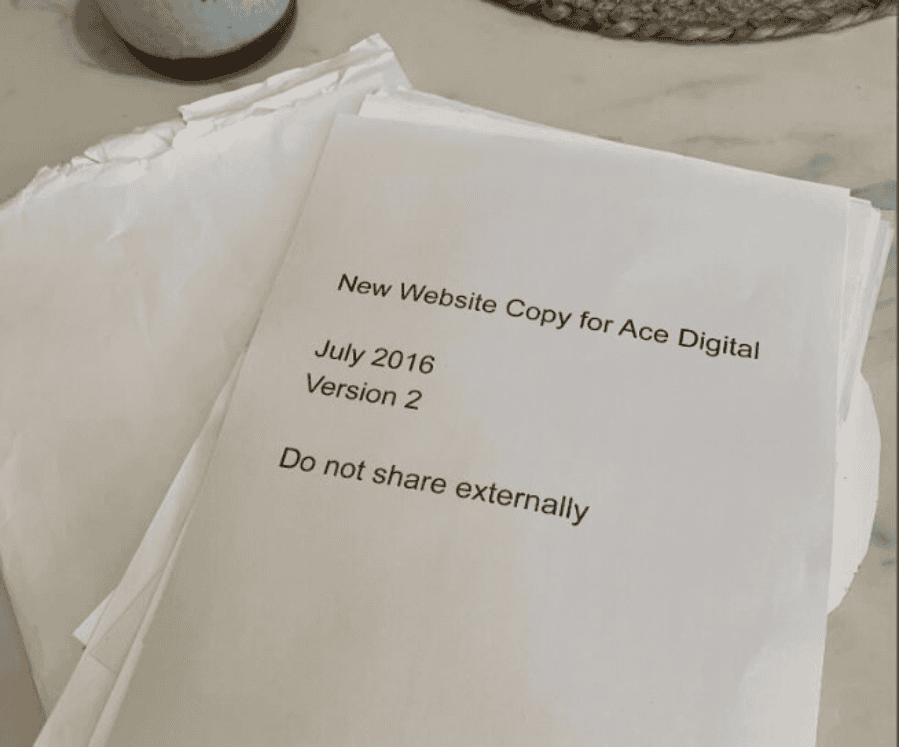
We’d once chased a client for a year for the copy on a single About Us page. A year! 

Then it eventually arrived in the mail with forty printed pages in it, logo on page one. (Seriously, this is a true story. I’ll never forget it)

printed paper that says new website copy for ace digital

So I did exactly what you did. I used AI to write faster.

And I did get faster, but nothing about my business changed. 

Same chasing, same weeks lost between handoffs, same evenings.

It took me an embarrassingly long time to work out why. Writing faster just made me quicker at the part clients were about to stop paying for. The envelope still took a year. Nothing I did in my own working hours was ever going to shorten that.

You didn’t speed up the slow part

We surveyed more than 500 agencies and website professionals, and the finding that stuck with me is this: once feedback enters a project, delivery balloons to five to seven times the build time.

I can build a full website on my own in a day or two. Add a client, a team member, or a manager who wanders in halfway through, and it’s four to six weeks. Every time.

Nobody is labouring for those extra weeks. The project is just sitting still. Inspiration plus silence. A new idea hits the client at midnight, a stakeholder disappears for a fortnight.

And lately we’ve been doing calls with community members so we can keep getting a better understanding of our audience.

We asked four of them what they’d delete from their work forever. Their answers aligned with what I’ve been seeing over the years: content gathering, chasing feedback, contracts. All of them named something around the craft, but building never came up.

So do the maths on your own AI gains. Three days of building becomes one, on a six-week delivery. You improved the project by two days. Congratulations, and I mean that sincerely, but you can see why your week feels identical.

Four things that actually shorten a project

  1. Measure how long the project sat still. Mark every day your last project was actually moving, then count the rest. The ratio is usually upsetting, and it’s the only number that tells you where to spend your attention.
  2. Stop asking for content. Send a draft to correct. Nobody can write their own fifty-word bio. Everybody can tell you what’s wrong with a bad one in ninety seconds.
  3. Kill the round trip on feedback. People give feedback in three to five words. “Move this up.” Then we ask them to turn that into a written report, and the conversion is the bit they postpone for a fortnight. Let them point and say the three words.
  4. Set the tempo yourself. Clients mirror your velocity. Reply in four days and they reply in four days. Turn things around the same afternoon and they start doing it too. We call this the leader follower effect.

We built Atarim V5 to solve these headaches around the build

I call it the AI web agency, plugged into yours: you connect your client sites, and a team of AI specialists picks up the work on them, running pre-built workflows within the approval steps you set. Those four things stop being things you have to remember.

The review lands before your client opens the page. The report goes out before they ask. Work you’d have absorbed comes back scoped and priced at your rate.

All of it arrives for a yes, so the only part still on your plate is the decision.

This is the version I wish I’d had in 2020, when I thought writing faster was the answer. You don’t need to get faster at what you’re already amazing at. You need everything AROUND the work to stop waiting on you.

What will you hand off first? Add your first URL and give it a spin.

What Web Agency Owners Actually Earn Per Hour: I Asked 50 of Them

Early on in my agency, the more responsive I was, the less I made.

Took me years to work out why, and it isn’t what you’d think, because it had nothing to do with discounting or bad clients or any of the usual suspects people point at.

I discovered I had a lot of leakage around the work.

Quick changes here and there, extra Zoom calls, small weekend jobs. A lot of it was 10 minutes or less and I’d feel petty charging for it. I’m a big believer in making deposits with clients, but if you keep doing free work it can add up fast.

I’ve been doing weekly calls with community members to hear what they’re dealing with, get to know them, and honestly, because it’s just fun to hang out.

But I ask all of them the same question:

Do you know how much you’re actually earning per hour?

Not the number on the invoice, the real one when you factor in everything going wrong around the work as well.

A lot of them weren’t sure, which is fair enough really, because most of us don’t charge hourly in the first place, but it’s still worth knowing what you’re coming out to at the end of a project.

So I did the math with a few of them right there on the call.

Most were coming in between $7 and $28 an hour. Seriously.

And these are people I know are amazing designers. But as you know, it’s not the work itself that’s hard, it’s everything around the work.

So on those calls I started walking people through some fixes, because none of this needs a new business model or a rate rise to solve.

Tip 1: Count the damage.

You HAVE to know what you’re working with before you can fix it. Go back through your last three projects and add up the hours spent on email, collating revisions, and recreating bugs. Don’t estimate. Actually count. Divide the fee by the real hours and write that number down.

Tip 2: Rethink how you deal with scope creep.

I have a hot take when it comes to scope creep: it’s not a problem at all. In fact, I love it. It means the client is inspired. It’s only bad if you’re not logging it.

Never say “no” to scope creep and crush your client’s spirit. Say “sounds amazing, let’s finish this current phase and come back to it later.” And if the project’s already done, that’s what the care plan is for. This keeps the client happy and gives you a backlog of work for slow months AND protects your margins.

Tip 3: Go looking for the big work instead of waiting for it.

I’ve always built whatever I needed at the time. In 2019 that was WP Feedback, because I couldn’t get a straight answer out of “make it pop.” Now it’s our version 5 to deal with everything around the work.

There’s no shortage of tasks worth charging for. They’re sitting on every client site you manage right now.

The only reason it never turns into money is that finding it, scoping it and writing it up takes an hour per client. So pick one client, give it that hour, walk their site, and send them five things that are broken or slow or five years out of date.

Or you can have Atarim do it. It goes through every site on your books, finds the work, and writes the brief with a price on it.

And when they say yes, you are not the one doing it. The build, the copy, the SEO and the QA all get handled inside the rules you set, and the finished work comes back to you for approval before it ever reaches the client’s site.

Click here to get started. Add your client’s projects and take it for a spin.

I’d love to know what’s been the biggest revenue leaker in your business and what you’ve done to solve it. 🙂

7 Years Ago I Was Stealing McDonald’s WiFi. Today We Turn the Page to Year Eight.

Years ago, I was parked outside a McDonalds somewhere in Europe, stealing their WiFi to build a website for a client between gigs. I had maybe two hours before soundcheck.

This is where Atarim has its earliest beginnings.

Not in an office with a fancy set up and a white board, but in a van with three guys who hadn’t done laundry in a week, and some fries going cold on the dashboard.

It Started Because The Band Broke Up

I was a kid from a small town in Israel. Borrowed an electric guitar to impress a girl. Slept with it next to me in bed that first night because I was already obsessed.

Spent a decade trying to become the best rock musician I could be, working weekends as the youngest top guitar salesman at the biggest music shop in the country, attending music college, and reading every business and marketing book I could buy on the side to grow the band.

We rebranded. Wrote new songs in English. Did an online launch using everything I’d taught myself.

Within a month, our little band from a tiny country got signed to a British label, packed up our lives and started touring Europe.

Went from playing to less than 10 people in pubs to thousands, sharing stages with artists I grew up listening to!

And… I was still broke.

The websites I was building from the van started getting noticed. People asked me to do the same for them. So McDonalds became my office, and “web designer” became the thing I did between sets.

Then, right after the biggest show we ever played, the band split up.

But it was the best thing that could have happened at the time. I was free. For the first time in a decade, I got to decide what came next, and I was buzzing to find out what I could build when the only person I had to convince was me.

Within a year of going full time on the agency, I’d hit six figures. And then I ran face-first into the wall every agency owner eventually hits.

The 4 Things That Were Eating My Agency Alive

Margins were shrinking. Bigger projects meant I’d be dealing with more chaos and more chaos meant more risk. A couple of slow months would have ruined the business.

When I sat down to figure out where the time was going, I kept hitting the same few problems on every project:

  1. Clients took forever to send content. They didn’t know how to give design feedback, so revision rounds dragged on. 
  2. They reached out for support through every channel imaginable: WhatsApp voice notes (my least favorite), Facebook DMs, LinkedIn, text messages, phone calls, Skype, Hangouts, emails, sometimes literally walking into the office. 
  3. And after launch, most never actually used the site as the marketing tool we’d built it to be.

My team was spending more time hunting for things than building them. A revision request buried in a Skype thread. One client on the phone right now while another had a 3pm meeting on the calendar.

I tried specialized spreadsheets, strict systems, SOPs, and nothing was really fixing the problem. To say I was pulling my hair out is an understatement.

So I built the thing I wished existed.

Year One: Click On The Damn Website

The first version of Atarim was a visual collaboration hub.

Clients could click on the exact part of a website they wanted changed and just leave a comment right there on the spot. No more “the third section, no wait, the fourth, the one with the blue button, no, the other blue button.”

You just point at the thing and say what you want.

I’ve always thought about what we do at Atarim as simply digitizing human experiences. And honestly, pointing at something and asking for it to be changed is about as human as it gets.

That instinct is the whole heart of the product.

Looking back, it sounds kind of obvious. But at the time, nobody was doing it. And the agencies who tried it? They never went back.

You Built This Before We Did

I don’t like to think we built the audience. You did.

Agency owners told other agency owners. WordCamp speakers were mentioning us from the stage without us ever asking. We’d sponsor an event and people would wander up to the booth going “oh, you’re the comment-on-the-website people.”

Then COVID hit.

We’d put a huge bet on WordCamp Asia in early 2020. We’d booked the flights, designed the booth, and shipped the swag (a huge amount of money worth of swag actually). 

We were less than a year old, and I was terrified that this was the end of the business before we could ever really get started.

So I asked the team: what if we still bring people together anyway?

That became the first Web Agency Summit. And on day one, we crashed our own platform because way more people showed up than we’d thought. For a couple of hours we were in full crisis mode, pulling in help from people across the industry who dropped what they were doing to jump on a call with us. We got it stable. Everyone saw every talk we promised and damn we had a lot of fun our first year.

Six years later, it’s the biggest event in our space. It happened because the community refused to let it not happen.

The Bet I Made In 2021

Around the same time, my long-time friend Andrew Palmer and I launched Bertha AI.

We were very lucky to be among the first 1,000 people to get access to GPT2 and back then ChatGPT hadn’t existed yet.

Andrew & I were very excited because we knew the biggest bottleneck in every website project we’d ever worked on was content. Clients couldn’t write it. Agencies couldn’t get it out of clients. Projects sat for weeks waiting for copy and we had solved it.

So we built Bertha. The world’s first AI writing assistant inside WordPress. Woo! (and the second inside Chrome!)

Bertha lived right inside the editor our customers already used. Hit a button, and Bertha would generate headlines, body copy, alt text, blog posts, the lot. She cut the time agencies spent on content by something like 90% when we did the research.

I pulled back from Bertha in early 2022 to focus on Atarim, and Andrew took the reins. We got destroyed by ChatGPT, but she’s still loved by the people who use her.

I learned a lot about building & working with AI from Bertha.

The Pivot I Refused To Rush

There’s a reason I waited a few years before adding AI to Atarim. There was no shortage of pressure to ship something fast, but I didn’t want to add it just to say we had it. I wanted to wait until we could do something that actually helped.

So we held off until the tech caught up enough to solve something real for the agencies who trust us with their work.

Then the models got good enough to see and understand a high-res mockup the way a designer would, and that’s when I knew it was time.

In October 2025, we launched the InnerCircle.

Six AI agents named Index, Pixel, Glitch, Lexi, Navi, and Claro, each with deep expertise in design, UX, SEO, front-end development, accessibility, and project management. 

They don’t sit off to the side as a separate chatbot. They live inside your projects with you, review your work in context, and give you the kind of feedback you’d expect from a senior teammate who actually understands what you’re trying to build.

We didn’t add AI to Atarim. We built a creative team that lives inside it and that was freaking cool!

What 7 Years Looks Like From Here

Which brings me to what’s next. 

The InnerCircle was step one: a creative team that reviews your work right alongside you. 

With v5, they stop just pointing things out and start doing the work with you, inside your projects, the same way a real teammate would. Flag a button that’s misaligned, a page that loads slow, a headline that falls flat, and they’ll go in and fix it inside the live project, then show you exactly what changed before anything ships.

That’s all I’ll say for now. But it’s the biggest leap we’ve taken since “click on the damn website,” and I think it changes what running an agency even looks like.

I am really excited to get this in your hands later this month.

Huge heartfelt thank you to you, the community, and everyone who’s been along for the ride these last seven years. I am so thankful for what we’ve built together.

Here’s to year eight. Let’s build it together.

Vito

Beyond the Build: How Agencies Can Win the Next Era of High-Converting Websites

As the industry gathers around events like Web Summit, one thing is becoming clear: the way agencies build websites is changing faster than most operating models can keep up with.

What used to be a linear, labor-intensive process is now being redefined by intelligent systems that change timelines, reduce manual work, and more importantly — reshape how performance is achieved.

This isn’t about working faster for the sake of efficiency. It’s about rethinking how agencies create value.

The Old Model Is Breaking Down

For years, agencies have operated within a familiar framework: discovery, wireframes, design, development, revisions, launch, and then optimization. It’s a process built on expertise, but also on time.

The challenge? Clients no longer measure value in hours spent. They measure it in outcomes delivered, and how quickly those outcomes arrive.

When a website takes weeks (or months) to go live, the opportunity cost is real. Campaigns are delayed. Revenue is postponed. Competitive advantage shrinks.

Agencies that continue to rely purely on manual workflows are starting to feel that pressure.

Speed Changes the Conversation

AI-powered website creation is often framed as a productivity upgrade. In reality, it’s much more than that.

When you can go from zero to a fully structured website in minutes with Brizy AI, the conversation with clients shifts. Instead of discussing timelines and deliverables, you’re discussing strategy, positioning, and growth.

Speed becomes a strategic lever:

  • Faster launches mean faster validation of ideas
  • Faster iterations mean better performance over time
  • Faster delivery means higher client satisfaction

But speed alone isn’t enough. What matters is what you’re speeding up.

Leadership Perspective: What This Shift Really Means

From a product and agency standpoint, this shift is not just about faster delivery — it’s about redefining what “building websites” actually means.

“We’re moving away from the idea that a website is something you ‘finish.’ Instead, it becomes something you continuously generate, refine, and align with business goals in real time. This is why we’ve created Brizy AI not only for cloud-hosted websites, but also WordPress,” adds Brizy CEO, Dimi Baitanciuc.

For agencies, this changes internal structure as much as external delivery. Teams are no longer just producing work — they are orchestrating systems that produce outcomes.

“The real shift is that agencies stop being production units and start becoming growth infrastructure for their clients,” he concludes.

From Blank Canvas to Block-Based AI Creation

One of the biggest inefficiencies in traditional web design is starting from a blank canvas — even when the business itself is already well defined.

With Brizy AI, agencies can now generate websites using real business inputs such as Google Business profiles, Facebook pages, or Instagram pages, instantly turning existing information into structured, usable websites.

But the real shift happens after generation. Brizy AI website builder is built around a block-based system, where every part of the website is flexible and editable. Agencies can:

  • regenerate entire sections with one click
  • replace text or images individually or across a full block
  • undo, redo, or fully regenerate sections
  • adjust fonts and colors dynamically
  • remove or rebuild sections that don’t fit the strategy

This turns website creation into an iterative process rather than a fixed build.

Instead of being locked into predefined templates, agencies can continuously refine structure and content as the project evolves.

With Brizy AI 1.5, the system also moves beyond standard page limitations. Agencies are no longer restricted to fixed page types like homepage, about, or services. They can now:

  • generate fully custom pages with specific naming and goals
  • let AI suggest page types based on industry context
  • add new pages during the AI generation process itself
  • insert new blocks anywhere on the page using structured categories like Hero, Features, Forms, or Carousel

Entire sections can also be replaced or removed instantly, allowing the website to evolve in real time instead of being locked into an early structure.

The result is a shift from static website building to adaptive website generation — where structure, content, and design continuously align with business needs.

Moving From Reactive to Predictive Performance

Conversion optimization has traditionally been reactive. You launch a site, gather data, and then start improving it through testing.

That model still works, but it’s slow.

What’s emerging now is a predictive approach. By learning from patterns across thousands of websites and user interactions, AI can suggest (or generate) structures that are aligned with conversion goals from day one.

For agencies, this changes the workflow:

  • Fewer cycles spent on basic optimization
  • More confidence in initial launches
  • More time allocated to high-impact improvements

It doesn’t eliminate testing—but it significantly shortens the path to performance.

UX Is No Longer Just Design—It’s Revenue

Agencies have always known that user experience matters. What’s changed is how directly it ties to business outcomes.

Users form opinions about a website almost instantly. If the experience feels confusing, slow, or cluttered, they leave. And when they leave, conversions disappear with them.

This is where intelligent systems bring a real advantage. They don’t just generate pages, but structure experiences:

  • Clear navigation that reduces friction
  • Content flow that guides decisions
  • Layouts that prioritize action over decoration

For agencies, this means delivering websites that don’t just look good in a presentation, but perform in the real world.

Personalization Is Becoming the New Standard

Looking ahead, one of the most important shifts agencies need to prepare for is personalization at scale.

Static websites are giving way to adaptive experiences: sites that adjust based on user behavior, intent, and context.

This opens up new possibilities:

  • Different messaging for different audience segments
  • Dynamic content that reflects user needs
  • Conversion paths that evolve in real time

For agencies, personalization isn’t just a feature, it’s an opportunity to offer more strategic value and deeper client impact.

The Business Model Shift Agencies Can’t Ignore

Perhaps the most important implication of all is how this transformation affects agency business models.

When execution becomes faster and more automated, the real value moves upstream:

  • Strategy over production
  • Systems over one-off projects
  • Recurring value over single deliverables

Agencies that embrace this shift can start to productize their services, offering website creation as a scalable solution rather than a custom-built process every time.

This doesn’t replace creativity. It amplifies it by removing repetitive work, teams gain more space to think, test, and innovate.

A New Role for Agencies

The agencies that will stand out in the next 12–24 months won’t be the ones that simply adopt new tools. They’ll be the ones that rethink their role entirely.

From builders to orchestrators.
From executors to strategic partners.
From service providers to growth enablers.

The Takeaway

High-converting websites are no longer defined by how much time goes into building them. They’re defined by how effectively they guide users, communicate value, and drive action.

The tools have changed. The expectations have changed. And the agencies that adapt fastest will be the ones that lead.

This isn’t about replacing what agencies do best.

It’s about removing everything that slows them down, and doubling down on what actually moves the needle.

This is the direction tools like Brizy AI are moving toward — where agencies don’t just build websites, they deploy systems that generate them.

Why Agencies Lack Visibility Into Client Sites And How to Fix It

When something breaks on your client’s site, the first question you ask is “How did this happen?” More often than not, this question goes unanswered. This is the visibility gap, and it’s one of the most common operational frustrations for agencies managing WordPress sites at scale.

The Visibility Gap: What It Is and Why It Exists

There are plenty of ways to get visibility into your WordPress sites, from plugins and uptime monitoring to managed hosting panels. However, this data is often too limited or fragmented to support effective troubleshooting.

For agencies, visibility is not just a technical concern about whether or not a website is up or down. True visibility means having a complete audit trail of what changed, when it happened, and which account made the change. 

There are several reasons why real visibility is so hard to achieve across a portfolio of client sites: 

  1. Multiple stakeholders with different access levels: on any given client site, you might have your agency’s developers, the client’s internal team, and a freelance designer brought in for a project. Each of these people can make changes, so without logging, there’s no record of who did what.
  2. Updates happen without context: plugin and theme updates are routine, but they can introduce conflicts or outright breakages. When an update silently causes a layout issue or disables a feature, tracing it back to a specific update, especially when multiple plugins are updated at once, is time-consuming without a clear audit trail.
  3. Clients make changes without telling you: client edits a page, removes a widget, changes a user role, or installs a new plugin, and the first time you find out is when something breaks. By then, the connection between cause and effect may be far from obvious.
  4. There’s very little default logging in WordPress: out of the box, WordPress records very little about what happens on a site. There’s no native activity log, no change history for settings or users, and no record of failed login attempts or permission changes. 

Visibility on a single site with just one or two users is manageable. Even with limited data, you can usually piece together what happened. But managing visibility on more complex setups with many users, or across entire portfolios of 20, 50, or 100+ client sites is a fundamentally different challenge.

At scale, the cognitive load of keeping track of every site and what happens on them becomes impossible. You can’t rely on memory, or on clients sharing information about changes they’ve made. Never the less, this is oftent he default, which results in hours of time spent investigating bugs and incidents. 

As a result, poor visibility means longer resolution times, increased support overhead, reduced client confidence, and difficulty scaling across multiple sites. And perhaps most importantly, poor visibility, in practice, often means poor security.

What Proper Visibility Requires

Closing the visibility gap requires more than basic logs. It requires detailed, actionable records that support accountability, investigation, and troubleshooting.

Here’s what that looks like in practice:

Granular activity logging

A good activity log shows what changed, who changed it, when, and, where relevant, including context such as IP address and session data. 

For a user account modification, that means logging not just that the account was edited, but which specific fields changed: email address, role, or password reset. For a plugin update, it means logging the previous and new versions.

This granularity matters enormously during incident response. If a client site suddenly starts behaving strangely on a Monday morning, being able to pull up a log and see that a specific plugin was updated at 6:56 AM by a particular admin account is the difference between a 10-minute fix and a 2-hour investigation, or even the difference between a minor hiccup and a fully hacked site.

Real-time alerts for critical changes

For high-risk events, you need to know as soon as something happens, not hours later. Real-time alerting means being notified immediately when someone new is granted admin access, when a plugin is deactivated, when a file is modified directly (which may indicate a compromise), or when multiple failed login attempts occur (which may indicate a brute-force attack). 

Offsite log storage

For more complex setups, effective visibility requires logs to be stored in a location separate from the site itself: whether that’s an external database, a dedicated log management service, or an integration with a third-party monitoring platform. This prevents unnecessary database bloat and ensures the logs can’t be tampered with should a major incident occur.

Centralized multisite visibility

For agencies, per-site logging isn’t enough. You need to be able to see activity across your entire client portfolio from a single interface. This means a central dashboard that aggregates alerts and recent activity from all managed sites.

The goal is to eliminate the need to log into each site individually to check what’s happening. 

How to Implement Visibility in Practice

The most practical starting point for most WordPress agencies is a dedicated activity logging plugin. WP Activity Log is a tool that provides this level of detail by capturing all changes on a WordPress site as well as relevant metadata around each change. Instead of simply recording that a user account was modified, it tracks which fields changed (e.g., email, role, password change event), along with contextual information where applicable.

This depth of logging extends across the site, including plugin and theme changes, taxonomy updates, widget modifications, and custom post type edits. For complex environments such as WooCommerce sites or membership websites, this level of detail significantly reduces investigation time. 

Make visibility part of your day-to-day operations

Beyond the tooling, it’s worth establishing a few operational habits in your agency that reinforce visibility as a practice:

  1. Document your access policies: know who has admin access to every client site, and review it regularly. Visibility tools show you what’s happening, but understanding who’s behind each account depends on how well you manage access.
  2. Set client expectations early: make it clear from the start of any client relationship that your agency uses activity logging as part of its standard site management practice. This reduces the awkwardness of raising it later, and it sets a professional tone around accountability and transparency.
  3. Use logs proactively, not just reactively: don’t wait for something to break before checking the logs. Build a habit of reviewing recent activity during regular maintenance windows, and you’ll often spot potential issues before they escalate.

Why Visibility Is a Competitive Advantage

Agencies that invest in proper visibility tooling aren’t just reducing their troubleshooting overhead; they’re building a more secure, scalable, and client-facing operation.

When a client asks why their site went down, or why a certain change was made, or whether unauthorized users have accessed their site, you want to be the agency that can provide a clear, detailed, timestamped record and walk the client through exactly what happened. That’s not just good service, it’s a competitive advantage.

As your portfolio grows, the processes and tools you put in place now will either support that growth or slow you down in the future. Getting visibility right early is a foundational investment in the effective agency you’re building.

Learn More at the Atarim Web Agency Summit 2026

If you’re dealing with the visibility gap we’ve described, join the Robert Abela session during Atarim Web Agency Summit 2026, “Incomplete, Delayed, and Deletable: Why Most Agencies Lack Real Visibility,” which breaks down the same problem from an operational and security perspective, with practical examples from real-world environments. 

Grab your spot → atarim.io/summit

​

Context Engineering for Agencies — How to Get Real Value from Every AI Tool You Use

“AI doesn’t really work. What do we do with that? Because people say, ‘Well, over time it’ll get better.’ All right — but you’re building a company now.”

That’s Jason Cohen. WP Engine, Smart Bear, two billion-dollar companies. If you run a WordPress agency, you’ve probably worked on top of his infrastructure.

And honestly? He’s right.

Open a fresh AI chat. Paste a URL. Explain who the client is. Remind it what you did last week. Get back something 80% right. Spend an hour cleaning up the 20%.

That’s not AI doing great work. That’s you doing great work — after the AI pretended to.

Same Claude. Same ChatGPT. Same Cursor. Same models every agency on earth uses. And yet — some agencies are pulling real 10x gains out of them. Others are stuck at “saved me twenty minutes, then I rewrote it anyway.”

Same tool. Different outcome. So what’s the difference?

Jason again:

“If AI is supposed to be so revolutionary, how come it’s only increasing my performance by 20%? It’s just not worth the hassle.”

That’s the whole game.

A 20% AI isn’t worth learning. A 10x AI rewrites how you operate. And the gap between the two is almost never the model.

It’s the context you give it.

What “context engineering” actually means

It’s a fancy term for something very unfancy. Context engineering is making sure your AI tools know the things they need to know before you ask them anything.

Their voice. Your standards. The history. The full picture.

Think of it like a new hire. The one who nodded through every briefing and then, on day one, wrote a proposal in a tone nobody at your agency would use, to a client they half-invented, quoting a service you haven’t offered since 2022.

That’s what generic AI does every time you open a fresh chat. Confident. Sounds right. Often catastrophically wrong. And you spend the next hour cleaning it up.

Congratulations. You just automated the easy part and kept the hard parts for yourself.

Why “just write better prompts” isn’t the answer

For a while, the fix was prompt engineering. Write cleverer instructions. Build a shared prompt library. Hand the team a one-pager of magic incantations.

It worked. Kind of. For single, one-off questions.

But agency work isn’t one-off. You’re juggling dozens of clients, each with their own voice, history, sites, preferences. No prompt carries all of that. You’d be writing novels before every question.

And you’re not paid to write novels.

So the real question stopped being how do I phrase this better? and started being how do I make sure the AI already knows the things it needs to know?

That’s context engineering. And it’s the difference between AI as a vaguely-useful 2x assistant and the 10x multiplier Jason is actually talking about.

What actually changes when the AI has the picture

You ask: “What’s the status of Mike’s sites?”

Generic AI shrugs. Context-aware AI answers: three sites, two up to date, one with a WooCommerce vulnerability flagged last Thursday, a backup from this morning, 99.98% uptime, last client call was about page speed, here’s where that landed.

You ask: “Draft a quick check-in for Sarah before our call.”

Generic AI invents a client. Context-aware AI pulls her last three tickets, the plugin update she was nervous about, the redesign brief you started in February, and the fact that she prefers warm, direct emails under four lines.

You ask: “Write the monthly report for Acme.”

Generic AI produces something vaguely plausible. Context-aware AI writes in your voice, from your data, at the exact level of technical depth Acme actually wants — because you told it once, and it stuck.

That’s not a small gap. That’s the whole difference between AI tried and AI delivered.

What a real agency brain actually unlocks

Every serious agency already has this context. It’s in senior developers’ heads. Scattered across Slack threads, Notion pages, client folders on Dropbox. In the muscle memory of whoever’s been on the team longest.

A real agency brain is all of that — clients, sites, standards, voice, processes — structured once, in one place, so any AI tool can use it.

When that’s in place, four things start to happen:

  • Any AI tool becomes agency-aware. One MCP endpoint — the open standard for connecting AI tools to your data — and Claude, Cursor, ChatGPT, and Claude Code all answer from the same source of truth. No more pasting the briefing three times.
  • Routine work collapses. The monthly report that used to take two hours takes ten minutes. Status summaries become conversations. Onboarding docs write themselves.
  • Operations stay traceable. Every site update, plugin install, and client change is logged — who did it, when, on which site. A real operational record, not a shrug when a client asks what changed.
  • Your best processes become repeatable. The way your senior dev audits a new client site. The way your PM writes a kickoff email. The way your agency handles a migration. Captured once, runs every time.

That last one is where the real gap opens up. In a world where every agency has the same AI models, the ones that win are the ones whose expertise actually travels — out of people’s heads, into something every team member and every AI tool can use.

Try this before Wednesday

You don’t need Dollie — or any platform — to start doing this.

Open an AI tool you can actually talk to out loud — ChatGPT voice, Claude voice, whatever your team already uses. Talking beats typing. You’ll go deeper, the answers come out more honestly, and the whole thing takes fifteen minutes instead of an afternoon.

Then paste this in:

“Hi. I’m an agency owner. I run an agency called [YOUR AGENCY NAME]. Your job is to help me build a repeatable agency brain I can reuse across any AI tool. Do an in-depth interview with me. Ask me questions until you genuinely understand how we work, how we communicate with clients, what we stand for, what makes us different, and what our standards are. When we’re done, turn my answers into a file called agency.md that I can reuse anywhere.”

Now actually answer. Properly. The way you’d brief a senior hire on day one. How you scope projects. How you write to clients. What a good kickoff looks like, and a bad one. The principles you won’t bend on. The stuff your team just knows without anyone saying it.

Do the exercise again for one of your best clients. Same structure — ask for the interview, get an acme.md out the other end.

Then open a fresh chat, drop both files in, and ask the same AI to draft Acme’s monthly report. Or write a kickoff email for a new project. Or audit one of their sites.

The difference will stop you in your tracks.

That’s an agency brain — the manual, hand-built version. A couple of markdown files, a couple of hours of interviews, and every AI tool your team uses gets dramatically sharper overnight.

Here’s the thing: the file you just built is a sneak peek at something bigger. At Web Agency Summit we’re announcing Agency.md — an initiative to turn that exact idea into a real, open standard, so your agency has a discoverable identity across the whole ecosystem of AI tools and hosts built for agencies. What you build by hand this week becomes a portable file the whole industry can read.

And we’ll show you how Dollie does it automatically — keeping that brain alive across every AI tool your team uses, for every client, without anyone rebuilding the context by hand. WAS attendees get a small early access window: a Dollie spot with all Pro features included, free during early access.

Either way — start this week. The tool question comes second.

Web Agency Summit 2026: Tickets Are Now Open

Registration for the 2026 Summit is live. April 27–30, online, free.

If You Were at the Last One, You Already Know…

Last year’s summit drew thousands of registrations from 120+ countries. Sessions like Karl Sakas on scope creep, Anton Osika on building a 7-figure AI-powered agency, and Vitaly Friedman on designing for AI interfaces packed out the live rooms and generated more post-event discussion than anything we’d run before.

Those sessions landed because they were solving the exact problems agencies were dealing with that week.

Real answers to real questions. That’s what we’re back to do in 2026.

Grab your spot → atarim.io/summit

What We’re Building for This Year

The format is sharper. Four days instead of five, with shorter and more focused sessions.

More panels and interactive discussions too, because the conversations in the room were often as valuable as the talks themselves.

The four tracks are designed around where agency growth actually gets stuck:

  • Build tackles delivery: scope creep, project systems, shipping without the chaos.
  • Expand is about running a business that doesn’t need you at the centre of every decision.
  • Scale covers client acquisition that doesn’t rely on luck or referrals.
  • Thrive is the longer game, the mindset and positioning that separates the agencies at the top from everyone else.

40+ masterclass-style sessions, all free, all with live Q&A, all run by people who’ve actually built and scaled agencies.

And did we mention the Web Agency Summit Awards?

The Networking Lounge Is Back!

mockup of the networking lounge

Some of the most valuable things to come out of previous Summits didn’t happen on stage. The Networking Lounge is where agency owners end up in conversations that turn into referrals, collaborations, and the occasional “we should just work together” that actually goes somewhere.

It’s back, and it’s bigger this year.

Register Now

Last year we registrations before the full speaker lineup was even announced. Once the community starts sharing, it moves quickly.